Guide
Handling calls after hours as a small business
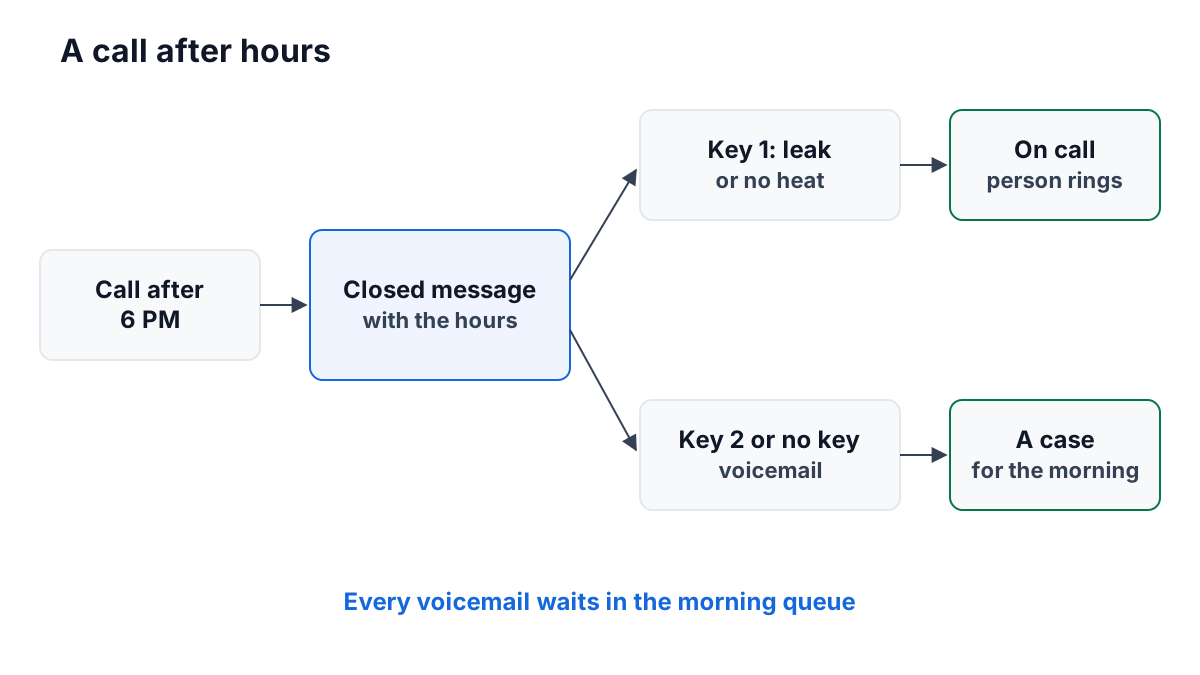
When the office closes, the phone keeps ringing. What a caller hears at 9 PM says as much about your business as what they hear at 10 AM. The good news is that a small team needs very little to handle it well: one message, one decision about urgent calls, and one place where messages wait for the morning.
This guide covers the three choices, what a closed message should say, how to set your hours once, and how to make sure no voicemail is lost. The worked example is a seven-person property management company we made up.
The three choices
1. A closed message, then voicemail
The caller hears that you are closed and when you open, then leaves a message. This is right for most small businesses, where nothing a customer calls about at night needs an answer before morning.
2. A closed message, then an on-call person
The caller hears the message, then is put through to whoever is on call that night. This suits a business where almost every after-hours call is urgent — a locksmith, a tow service, an emergency vet.
3. A closed message, a choice, then either
The caller hears the message and chooses: press one key if it is urgent and reach the on-call person, or leave a message for anything else. This is the best fit for businesses where some calls cannot wait and most can. It protects the on-call person’s night, because the routine calls never reach their phone.
| After hours | Closed message + voicemail | Closed message + on call | Closed message + a choice |
|---|---|---|---|
| Who it suits | Offices, agencies, shops | Emergency services | Trades, property, IT support |
| Cost to the team | None until morning | Every call wakes someone | Only urgent calls wake someone |
| Risk | An urgent call waits | Routine calls wake someone | Callers who call everything urgent |
The last risk is real but smaller than it sounds. Most people are honest about what is urgent when the message spells it out: “If water is leaking or you have no heat, press 1.” A vague “for emergencies” invites everyone in.
What a closed message should say
Four things, in this order:
- Who they have reached. “Thanks for calling Gorsebrook Property Management.”
- That you are closed. “We are closed at the moment.”
- When you open. “Our office is open 8 AM to 6 PM, Monday to Friday.”
- What to do if it cannot wait. “If water is leaking or you have no heat, press 1. Otherwise, press 2 to leave a message and we will call you back tomorrow.”
Keep it short. Every sentence is a few seconds the caller holds the phone without being helped. Leave out the website address and the email address — a caller who wanted to write would not be calling. If there is a page on your site that answers common questions, one short sentence pointing to it is fine.
If you record your calls, the recording announcement belongs in this message too. Our guide to telling callers a call is recorded covers the wording.
The phone menu script builder has fill-in templates for a closed message and a voicemail prompt, with how long each takes to say.
Set your hours once
The worst after-hours setup is one someone has to remember. “Whoever leaves last switches the phones over” works until the night no one does, and then customers ring an empty office.
Set your opening hours once, in one place, and have the phones follow them. If your phone system and your support tools each keep their own hours, you will one day change one and not the other. One schedule, read by everything, is the goal.
Holidays need a plan. Many systems let you add holiday dates to the schedule. If yours does not, decide now who changes the phones before a holiday and back after it, and put both on the calendar the week before. A public holiday that rings as an ordinary Monday is how a business ends up with a queue of angry voicemails by noon.
Where the voicemail goes the next morning
A voicemail that sits in a mailbox no one checks is worse than no voicemail. The caller has done their part and believes you have their message.
Three habits keep messages from getting lost:
- Messages land where the team already works. If the morning starts in a shared queue or inbox, the voicemails should be in it, not in a separate phone app.
- One person makes the first pass. Decide who goes through the night’s messages first thing and hands each one to the right person. Rotate it weekly if you like.
- Each message gets an answer the same day, even if the answer is “we are looking into it”. Our guide to email response times makes the same case for email.
The worked example: a property management company
Gorsebrook Property Management has seven people: Rosa and Tom in the office, Jade on accounts, and four maintenance staff. Their tenants call about rent, viewings and repairs. Most of it can wait for morning. A leak cannot.
Their phone setup after 6 PM:
- Closed message: “Thanks for calling Gorsebrook Property Management. We are closed at the moment. Our office is open 8 AM to 6 PM, Monday to Friday.”
- A choice: “If water is leaking or you have no heat, press 1.” “To leave a message, press 2.”
- Key 1 rings the On call group — the one maintenance person on call that week. Each Monday, Rosa changes who is in the group.
- Key 2, and a caller who presses nothing, leaves a message.
Every voicemail becomes an item in the team’s shared queue, with the caller’s number and when they called. At 8 AM Tom goes through the night’s messages: a tenant asking about a late fee goes to Jade, a viewing request to Rosa. By 9 AM every caller from the night before has an owner, and most have had a call back.
On the Friday before a long weekend, Rosa notes the holiday on the team calendar, with a reminder to switch the phones to the after-hours setup for Monday and back again on Tuesday.
A checklist before you rely on it
- Write the closed message: who, closed, your hours, what to do if urgent.
- Decide which calls are urgent, in words a caller will understand.
- Name an on-call person or group, and who changes it.
- Set your hours once, in one place.
- Put holidays on the calendar with a reminder to change the phones.
- Make voicemails land where the team works in the morning, with one person for the first pass.
- Call your own number after hours, press each key, and press nothing.
How ContactRoll does it
In ContactRoll, your business hours are set once, on the Business hours page, and a number with no setup of its own rings its call group in those hours and offers voicemail outside them. Give a number a setup and you can write its closed message, then take a message, ring an on-call call group or offer a menu of its own. One ready-made template, “After hours, urgent only”, works like Gorsebrook’s with the keys the other way around: 1 to leave a message, 2 if it is urgent, and pressing nothing leaves a message. Every voicemail opens a case in the case queue, saying a voicemail was left and keeping the recording in your own Twilio account. Business hours are one weekly schedule with no holiday dates, so for a holiday you switch on a version of the number’s setup for the day and press Put back the one before afterwards. More on calling in ContactRoll.
Questions
What should an after-hours phone message say?
Who the caller has reached, that you are closed, when you open again, and what to do if it cannot wait. Keep it to three or four short sentences.
Does a small business need an on-call person after hours?
Only if some calls truly cannot wait until morning, such as a leak or a system that has stopped working. If none can, a clear closed message and voicemail are enough.
How do I make sure after-hours voicemails are not missed?
Have every voicemail land somewhere the team already works from in the morning, with one person responsible for the first look, rather than in a mailbox someone has to remember to check.