Guide
Help desk vs shared inbox: which does a small team need?
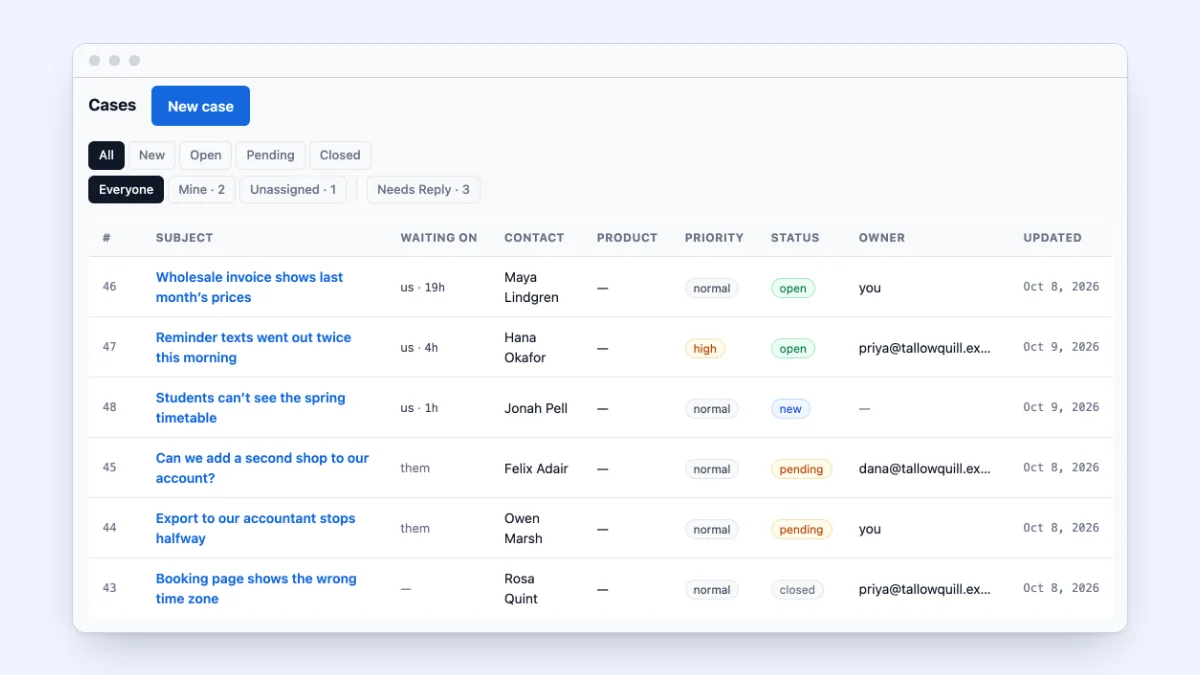
Most small teams answer customer email from one address everyone can read. For a while, that is all they need. Then the team grows, or the email does, and the address starts causing the trouble it used to prevent: two replies to one customer, none to another, and nobody sure how long anyone has waited.
This guide says what each one is, how to tell when a team has outgrown a shared inbox, and how to move, with one week at a five-person shop told both ways.
A shared inbox and a help desk, in plain terms
A shared inbox is one address, such as support@, that several people read: a group address that copies each message to everyone, a shared mailbox, or one login the whole team uses. However it is built, every message is still an email. The inbox knows whether a message has been read. It does not know who is dealing with it.
A help desk turns each message into a case, often called a ticket: a piece of work with a start and an end. A case carries four things an email does not.
| A case records | The question it answers |
|---|---|
| An owner | Who is dealing with this? |
| A status | Is it new, in progress or done? |
| Who it is waiting on | Is it our move or the customer’s? |
| A clock | How long has the customer waited? |
The customer sees no difference: they send an email and get one back.
Some tools sold as shared inboxes let you assign each email and give it a status, which makes them help desks in all but name. Judge a tool by what it records about each message, not by what it calls itself.
What a shared inbox does well
A shared inbox deserves more credit than it gets. There is nothing to learn, because it is email, and nothing to set up beyond the address. Everyone sees every message.
It is enough when one or two people answer, the volume is low, and they can see each other’s work. One person has no one to collide with. Two people who sit together and get a handful of emails a day can split them with one rule, such as “you take orders, I take everything else.”
It also asks for no new habits. A help desk does: taking a case before answering it, and closing it when it is done. For a team of one, those habits cost time and save none.
Five signs a team has outgrown its shared inbox
The trouble starts when people can no longer see each other’s work. As a rough guide, that happens when three or more people answer, or at around twenty emails a day.
- Two people answer the same email. Both thought it was theirs, and the customer gets two replies that do not quite agree.
- Nobody answers one. Everyone assumed someone else had it. Once read, it looks handled, and nothing brings it back.
- No one can say how long a customer has waited. The inbox puts the newest email at the top, so whoever has waited longest is at the bottom, under everything that arrived since.
- The history lives in one person’s inbox. Someone answered from their own address, and the rest of the conversation went with them.
- A vacation stops conversations. Before a week away, someone has to remember every thread they had going.
One of these now and then is normal; several a week is the sign. To check, spend a week marking every email that got two replies or none.
One week at a five-person tea shop, both ways
Kettlefern Tea is a made-up online shop that sells loose-leaf tea by the bag and by monthly subscription. Mara owns it and handles wholesale. Dev and Ines pack orders and answer email, Orrin works afternoons, and Liesel keeps the books and approves refunds. Customers write to support@, about 25 emails a day.
The week in a shared inbox
Monday. The weekend left 40 emails. A package had arrived crushed. Dev replied that a new one would ship that day; ten minutes later Ines, who had not seen his reply, asked the customer for a photo. The customer sent one, and Ines shipped a second replacement.
Tuesday. A café asked about a monthly wholesale order. Three people read it on their phones, and each assumed Mara would answer, because wholesale is hers. Mara was out all day. Nobody replied.
Wednesday. A subscriber had asked on Monday to skip a month. Her email was now two screens down, and someone had opened it, so it looked handled. She wrote again to ask whether anyone was there.
Thursday. Ines handled a refund question from her own email address. When the customer wrote to support@ the next day, no one reading it had seen the conversation.
Friday. Ines left for a week’s vacation. She emailed the team a list of what she had open, from memory, and missed two threads, one of them Thursday’s refund.
Nobody did anything wrong. The inbox gave them no way to see what the others were doing.
The same week as cases
Monday. Every email became a case with no owner. Dev took the case about the crushed package, so when Ines reached it, his name was on it and she moved on. One reply, one replacement.
Tuesday. At 1 PM the café’s question was still unowned. Kettlefern’s rule is that whoever checks the queue then takes or hands on anything unowned, so Orrin handed it to Mara with a note. She answered that evening.
Wednesday. The subscriber never had to write again. Her request sat with the cases waiting on the team, its clock running, and when Orrin started on Monday afternoon it was the longest wait left. He answered it first.
Thursday. Ines answered the refund from the case, so her reply and the customer’s answer stayed on one case where everyone could see them. Liesel approved the amount in an internal note the customer never saw.
Friday. Ines looked at her own cases: six open. She handed each to Dev or Orrin with a one-line note, and when the refund customer wrote back the next Monday, Dev already owned the case.
Same people, same email, same week. Every message had an owner, the list showed whose move it was, and the clock showed who had waited longest.
What to look for in a help desk at this size
A team of this size needs a few things done well:
- One owner per case, shown in the list, along with the cases nobody has taken yet.
- “Waiting on”, worked out from who wrote last. If the customer wrote last, the case waits on you; if you did, it waits on them. A status someone must remember to change will be wrong by Wednesday.
- A clock, and a target in business hours. Count from when the customer wrote, not from when the case opened. A target such as “first reply within four business hours” turns the clock into a deadline; how fast a small team should reply to email covers setting one.
- Saved replies for the questions that repeat, with the customer’s name filled in and a blank only a person can fill. Our support email templates are a place to start.
- Internal notes beside the conversation, which the customer never sees.
- Handing a case on to a colleague with a note, and asking someone a question without giving the case away.
- Replies that stay together: when the customer answers, the answer lands on the same case.
If a help desk charges per user, count everyone who answers email, including whoever covers on Fridays.
How to move in an afternoon
Most small teams can move in an afternoon, keeping the old inbox as a fallback.
- Set up the help desk and invite everyone who answers, each with their own login, so you can tell who did what.
- Forward your support address to the help desk. Customers keep writing to the address they know. Send a test from a personal address, reply from the help desk, answer that reply, and check that the answer lands on the same case.
- Agree what each status means, in a line each. For example: new, nobody has taken it; open, someone is on it; pending, waiting on the customer; closed, done.
- Write five saved replies for the five questions the last two weeks of email asked most.
- Agree on ownership. Five rules cover most of it:
- Whoever opens an unowned case takes it, or hands it to the right person.
- Only the owner writes to the customer; everyone else helps in internal notes.
- Someone checks for unowned cases at set times, such as 9 AM and 1 PM.
- Before time off, hand off every open case with a note.
- Close a case when it is done.
- Leave the old threads where they are. A customer who replies to an old email from the support address usually opens a new case.
For the first week, look at the queue together for five minutes each morning. For the daily habits after that, see how a small team should handle support email.
Help desk or shared inbox: a decision table
| If this is true of your team | Choose |
|---|---|
| One person answers all support email | A shared inbox |
| Two people who sit together, a handful of emails a day | A shared inbox, with a rule about who answers what |
| Three or more people answer, or about twenty emails arrive a day | A help desk |
| A customer got two replies, or none, more than once this month | A help desk |
| No one can say how long the oldest unanswered email has waited | A help desk |
| A vacation stops conversations | A help desk |
| Support questions often turn into sales or billing questions | A help desk that keeps one record of each customer |
If support is one part of a bigger choice, how to choose a CRM for a small team shows how to score tools against your own week.
How ContactRoll does it
In ContactRoll, each organization gets its own support address, and you forward the one your customers already use to it. When a customer writes, a case opens, ready for somebody to take, and its clock starts. The queue says who each case waits on, worked out from who wrote last: “us” and how long, “them”, or a dash. You send a reply and set the status in one step, or snooze a case until a time you choose. Saved replies fill in the customer’s first name, your name and the case number. A response-time target, for the whole team or per product, counts down on each case in business hours. A note is for the team and is never emailed to the customer. You can ask a colleague one question and leave the case where it is, or hand off the case to a member or a team, with a note. On a case, ContactRoll suggests the team’s knowledge articles from the case’s own words. You can start free, with no card, and see the pricing.
Questions
What is the difference between a help desk and a shared inbox?
A shared inbox is one email address that several people read, and every message in it stays an email. A help desk turns each message into a case with an owner, a status, who it is waiting on and a clock for the customer’s wait. The customer sends and gets email either way; the difference is on your side.
Is a shared inbox enough for a small team?
It is for one or two people who can see each other’s work and get a handful of emails a day. Once three or more people answer, or the volume nears twenty a day, replies start to double up or go missing, and a help desk is worth the small habits it asks for.
How do I know if I need a help desk?
You need one when two people answer the same email, an email goes unanswered, or no one can say how long a customer has waited. For one week, mark every email that got two replies or none, and the count will tell you.