
ContactRoll
Menu
Start free, no cardStart free

Free for up to 3 people · no card

One tool instead of three. Your CRM, help desk and phone system in one place, for small and growing teams.

ContactRoll puts a team’s sales, support email, phone calls and marketing email on one record of each customer, with one login and one subscription, in place of a separate CRM, help desk and phone system.

  • Free for up to 3 people
  • Paid plans from $29 per user a month
  • Calls billed at cost by your own Twilio account
  • Data kept in the United States

A tour of ContactRoll

A tour of ContactRoll in 10 steps

Step 1 of 10

Everything in one place

Cases, contacts, deals, calls and campaigns are sections of one product, and each of them reads the same record of each customer.

ContactRoll in Tallowquill Support: every section in groups — Support, Sales, Marketing, Reports and Settings — in a sidebar at a desk and in a menu on a phone, beside the case queue.

Step 2 of 10

A customer’s email becomes a case

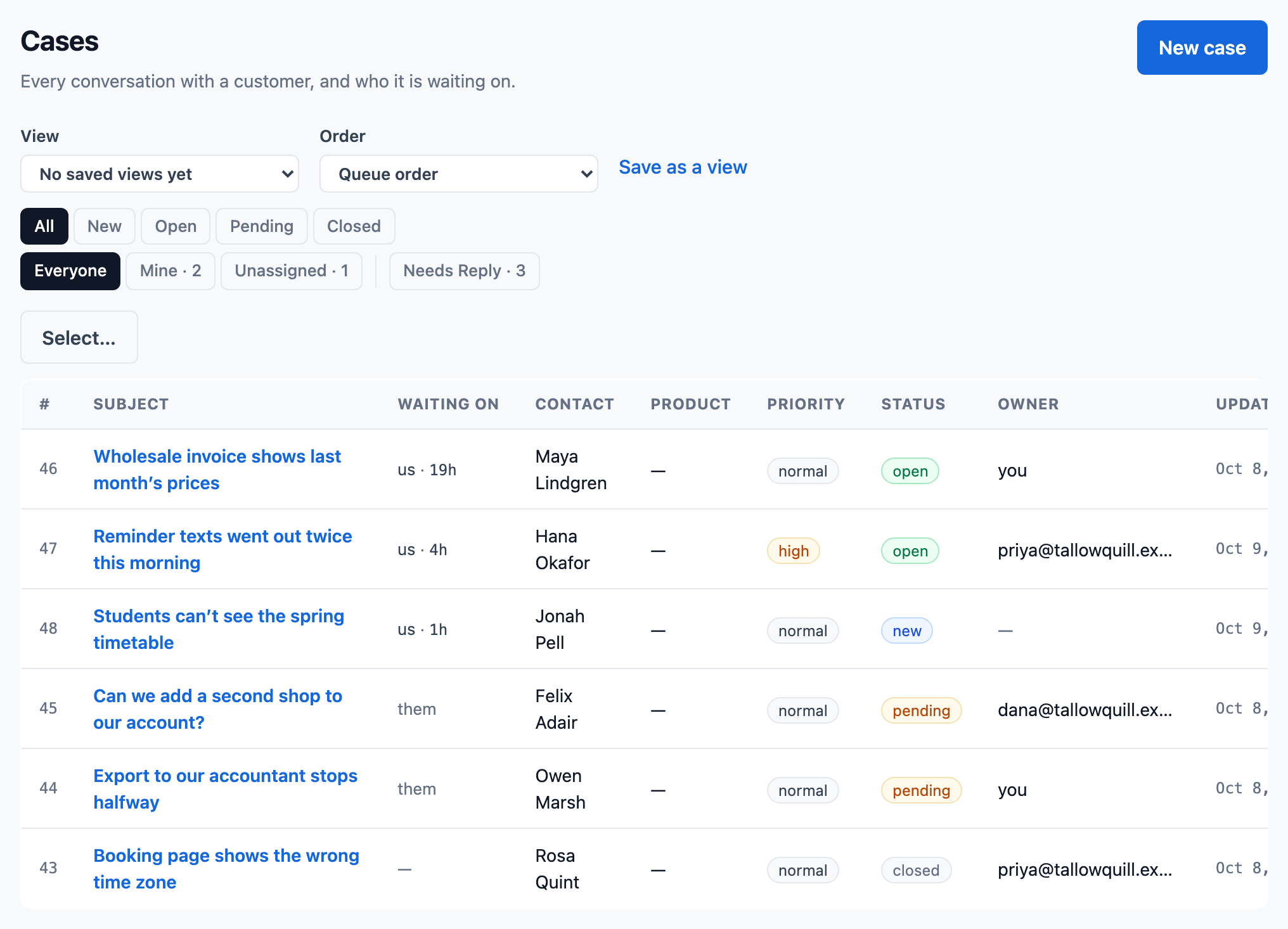
Forward your support address to ContactRoll, and each email opens a case. The queue says who each case is waiting on, you or the customer, and for how long.

The case queue of Tallowquill Support. Cases waiting on a reply are at the top, the oldest reading “us · 19h”; below them, cases waiting on the customer read “them”. Each row gives the subject, the customer, who the case waits on and its status.

Step 3 of 10

Reply on the case

The customer’s emails and your answers are one conversation. Write the reply and press Send to email it; the arrow beside Send sets the case’s status in the same press.

A case’s conversation in Tallowquill Support: Sam’s reply to Maya Lindgren about October’s invoice, and below it the next reply being written, with “Email this to maya@crumbhollow.example” ticked and a Send button.

Step 4 of 10

Ask a colleague, in a note

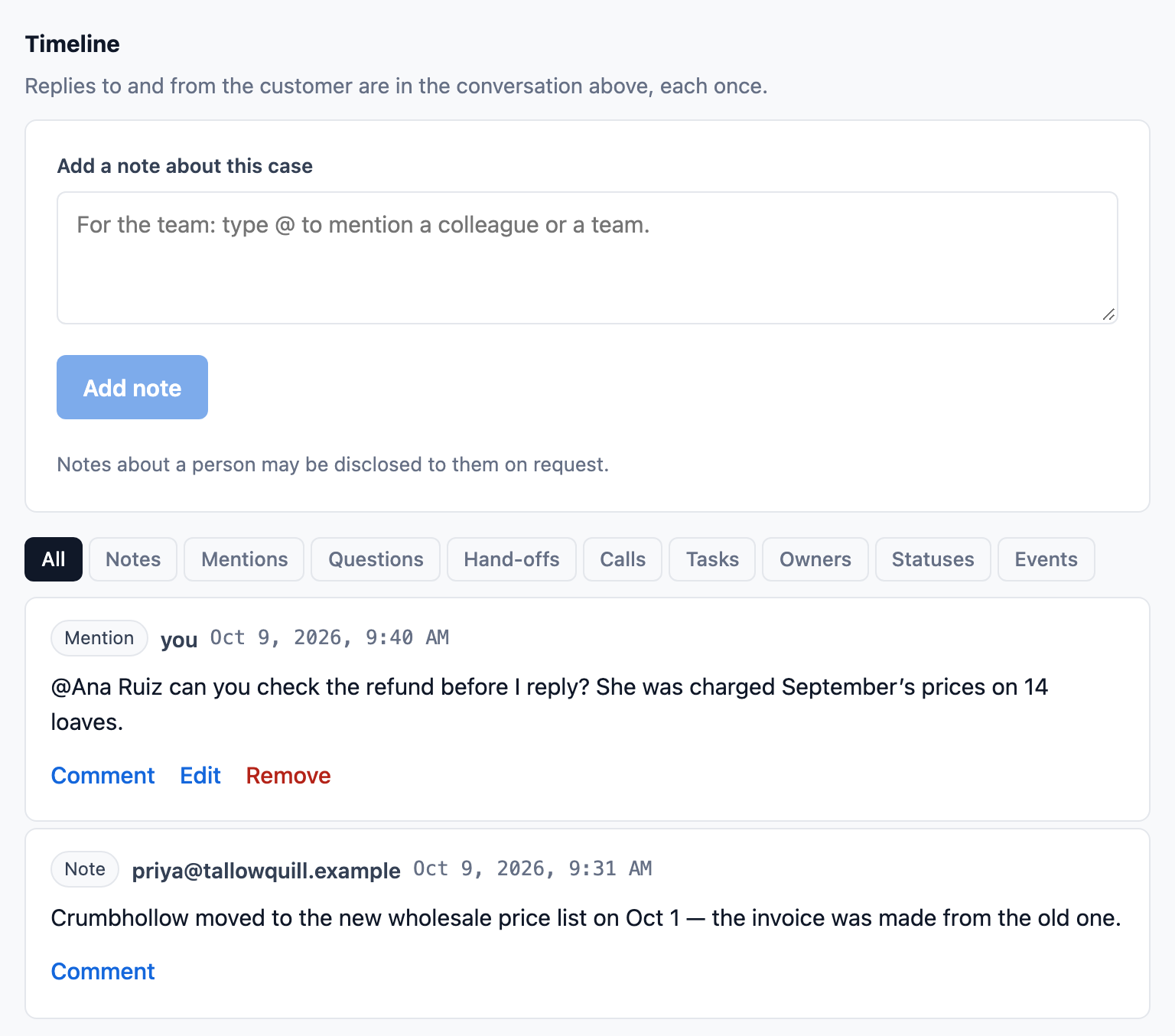
A note is for the team and is never emailed to the customer. Type @ to mention a colleague or a team, and they are told.

A case’s timeline in Tallowquill Support: a box to add a note for the team, filters by kind of entry, and two entries: a mention asking Ana Ruiz to check a refund before the reply, and Priya’s note that the customer moved to the new wholesale price list on Oct 1.

Step 5 of 10

One record of each customer

Open a contact to see their company, their phone numbers and their cases, with every email, call, note and deal on one timeline.

A contact’s page in Tallowquill Support: Maya Lindgren of Crumbhollow Bakery, her email, owner and when she was added, two phone numbers with one marked to call first, and her open case with who it is waiting on.

Step 6 of 10

Move a deal along

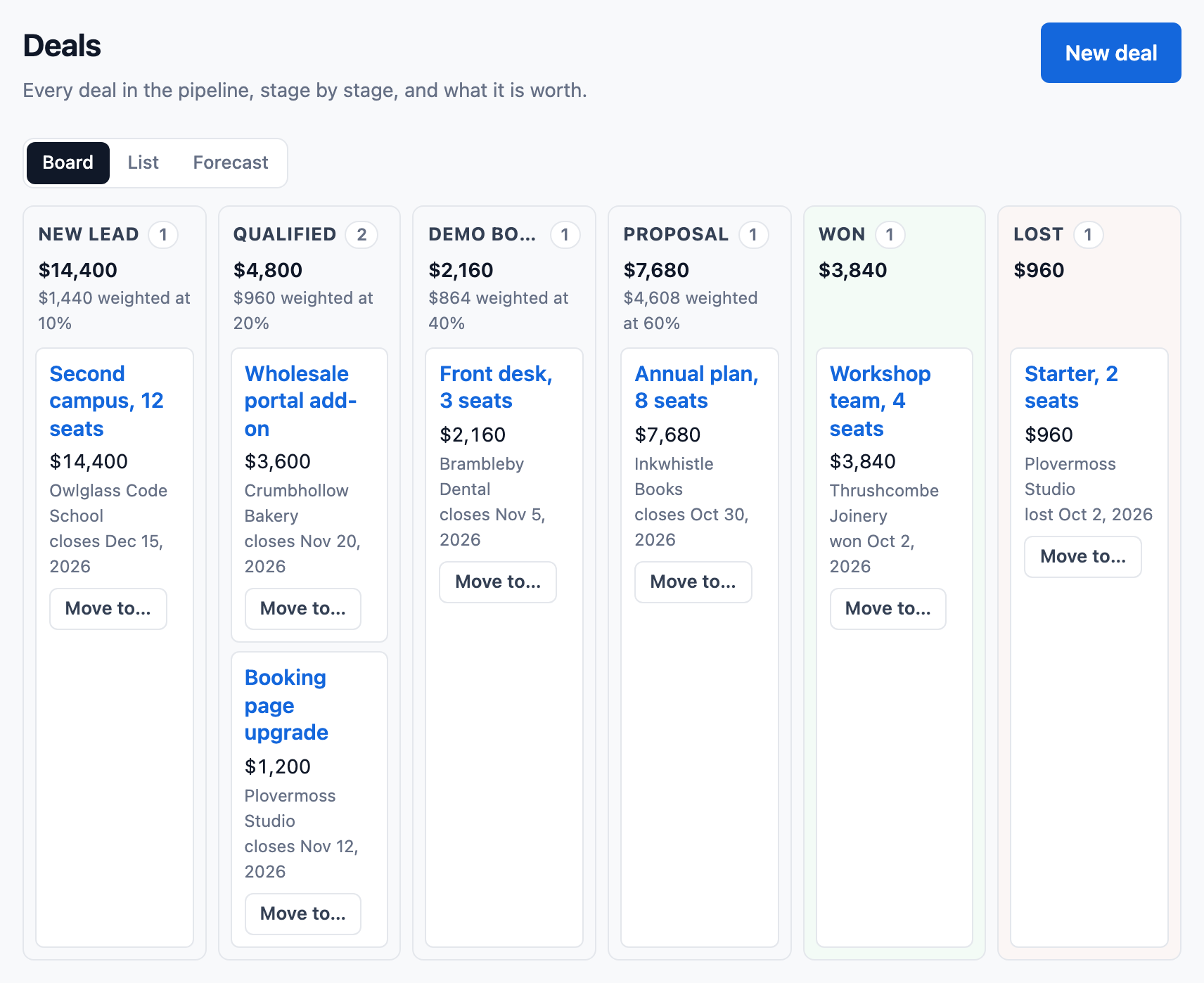
Drag a deal to its next stage, or press Move to. Each stage shows its total, and that total weighted by its chance of winning.

Tallowquill Support’s deals, stage by stage from New lead to Lost: each stage headed by how many deals it holds and their total, each open stage also by that total weighted by its chance of winning, and each deal with its amount, company, close date and a Move to button.

Step 7 of 10

Take the call in the browser

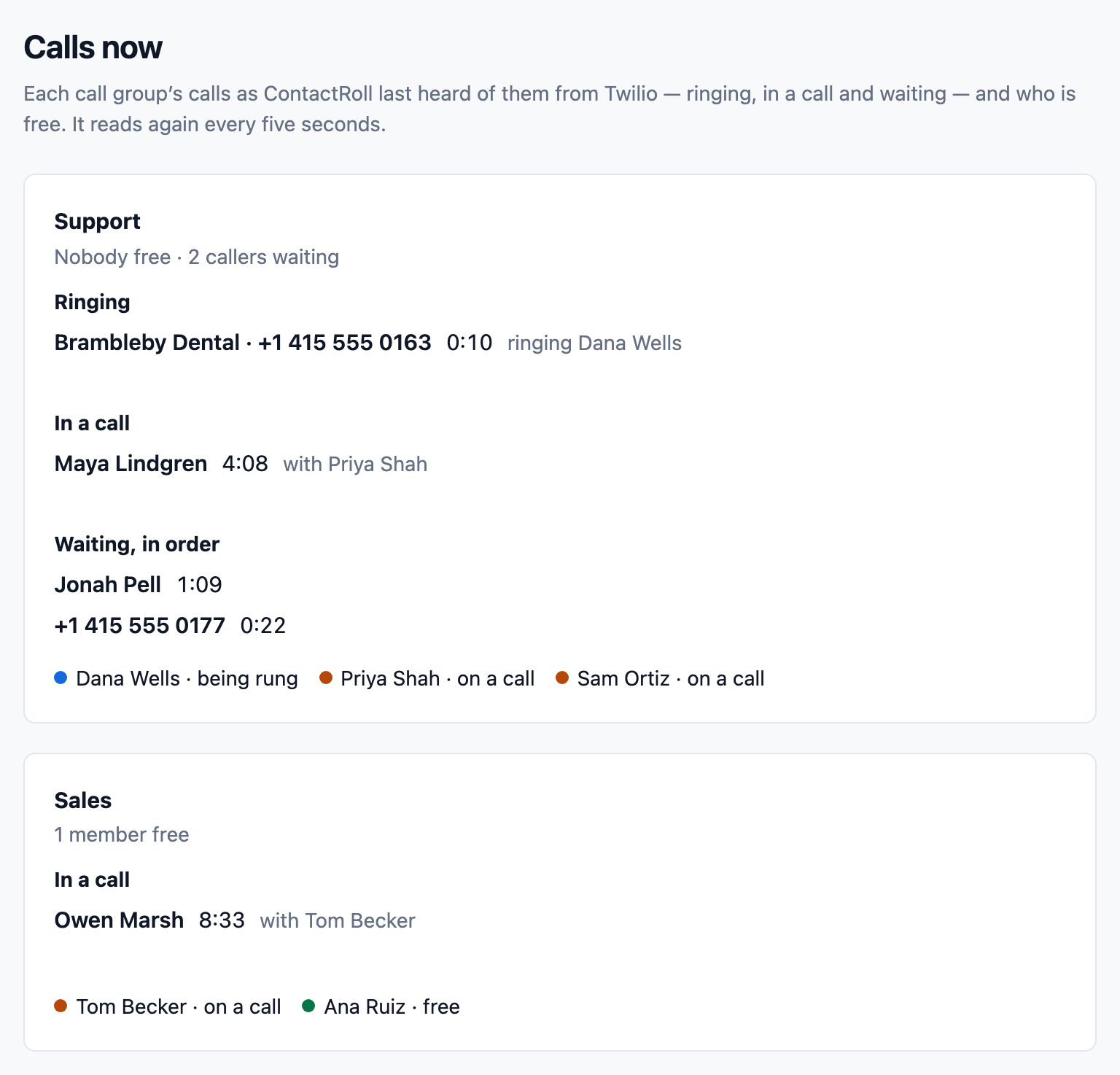
Calls go through your own Twilio account. A call to your number rings the free members of its group, and Calls now shows who is ringing, who is talking and who is waiting.

A live view of every call in Tallowquill Support: the Support group with nobody free, a call from Brambleby Dental ringing Dana Wells, Maya Lindgren in a call with Priya Shah, two callers waiting in order with how long each has waited, and each member’s state.

Step 8 of 10Plus

Hand the caller to a colleague

Talk to a colleague first while the caller waits on hold, then complete the transfer, or take the caller back.

The calling bar during a warm transfer: in a call with Hana Okafor, Sam is talking to Ana Ruiz while the caller is on hold and cannot hear, with buttons to complete the transfer or take the caller back, beside the case queue.

Step 9 of 10

The call stays on the case

Each call is listed on its case and its contact. Where your team records calls, the recording plays right there, as does a voicemail.

Calls on a case in Tallowquill Support: an outgoing call with Maya Lindgren, connected, 2 min 14 s, its recording paused at 0:51 with speeds of 1×, 1.5× and 2×; and an incoming call where she left a 38-second voicemail.

Step 10 of 10

Try it with your own team

Every new organization starts with a 14-day trial of Plus, with no card. When it ends, a team of 3 people or fewer moves to Free by itself, and a larger team chooses Standard or Plus. There is no second trial.

Start 14-day Plus trial

What ContactRoll is

  • CRM
  • Help desk
  • Phone system
  • Email marketing

All four, joined into ContactRoll

One login, one subscription and one record of each customer, for the whole team. Calls are billed at cost by your own Twilio account.

See it in under a minute

One customer, from a support email to a call to a deal, on one record.

The video “Five tabs to answer one customer?”: the words “Five tabs? One record.”, the ContactRoll mascot, and a case page with its reply clock, “Reply in 3 h 55 m”. (watch on YouTube, 0:54)
Watch on YouTube: Five tabs to answer one customer? (0:54)

What it does

Four parts. One product.

Each part works on its own, and each one sees what the others know about the customer.

A pipeline you drag, beside everything else the customer did.

Contacts, companies and deals with an amount, a stage and a close date. Each stage shows its total and what it is worth weighted by its chance of closing.

  • Drag a deal to its next stage, or move it with the keyboard
  • A lost deal keeps the reason it was lost
  • The deal’s history: who changed what, and when

How sales works

Tallowquill Support’s deals, stage by stage from New lead to Lost: each stage headed by how many deals it holds and their total, each open stage also by that total weighted by its chance of winning, and each deal with its amount, company, close date and a Move to button.

Customer email becomes a case that anyone on the team can take.

The queue says who each case is waiting on, us or the customer, and for how long, so the customer who has waited longest is always answered first.

  • Saved replies and knowledge articles that go into a reply
  • Send and close, or snooze until a set time
  • Ask a colleague, or hand the case off

How support works

The case queue of Tallowquill Support. Cases waiting on a reply are at the top, the oldest reading “us · 19h”; below them, cases waiting on the customer read “them”. Each row gives the subject, the customer, who the case waits on and its status.

Calls in the browser, through your own Twilio account.

A call to your number rings the members of its group who are free. Callers wait in line with music, and a live view of every call shows who is ringing, who is on a call and who is waiting.

  • Call groups, voicemail, hold and transfer
  • Recordings you can play on the case
  • Twilio bills your own account, with no markup from us

How calling works

A live view of every call in Tallowquill Support: the Support group with nobody free, a call from Brambleby Dental ringing Dana Wells, Maya Lindgren in a call with Priya Shah, two callers waiting in order with how long each has waited, and each member’s state.

Campaigns that reach only people who said yes.

Campaigns and sequences on a calendar, each piece approved by a person before it goes. Sign-up forms ask for confirmation, and every marketing email has a one-click unsubscribe.

  • A calendar of every planned piece
  • Double opt-in sign-up forms
  • Results per campaign, and the revenue it brought

How marketing works

Tallowquill Support’s marketing calendar for the month. Each planned piece sits on its day with its time, its name, whether it is an email or a video, and its status. A warning in orange reads “Two posts too close” where two videos go to one channel an hour apart.

One record

Every email, call, note and deal on one timeline.

Open a customer and see everything that happened, whoever did it. Write a note and @mention a colleague or a team: they are told, and they answer in the same place.

  • A note is internal: it is never emailed to the customer.
  • One page lists everything you were asked.
  • On a case, you can ask a colleague one question, or hand the case to someone else.

How working together works

A case’s timeline in Tallowquill Support: a box to add a note for the team, filters by kind of entry, and two entries: a mention asking Ana Ruiz to check a refund before the reply, and Priya’s note that the customer moved to the new wholesale price list on Oct 1.

Beyond the basics

What sets ContactRoll apart.

Phone menus and call groups, from ready-made templates

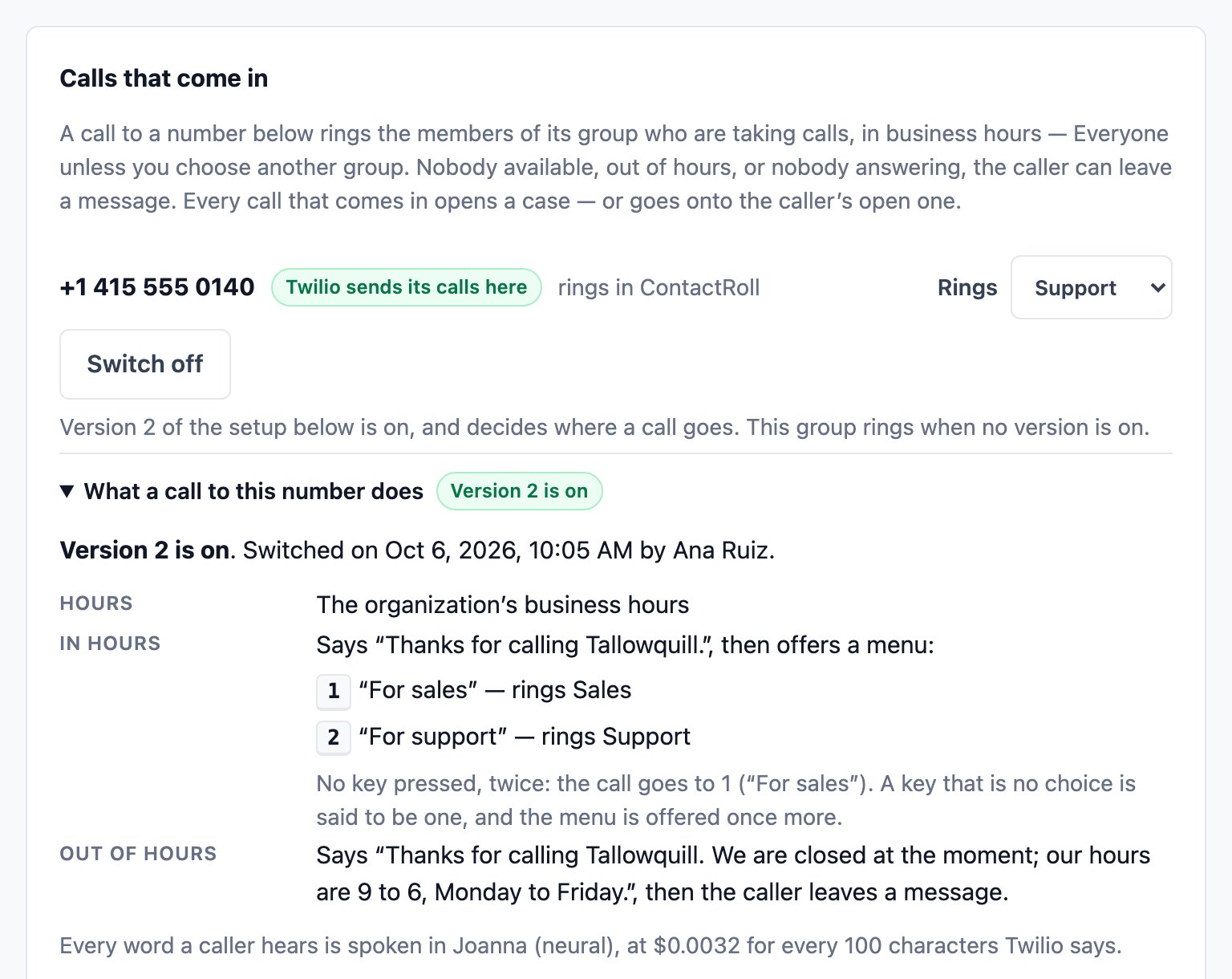
Give each number its hours, a greeting and a menu of up to four keys, each ringing a call group. Start from one of six templates, and go back to the previous version in one click.

Calling
A number’s setup in Tallowquill Support, version 2 switched on by Ana Ruiz: in business hours it says “Thanks for calling Tallowquill.” and offers a menu, 1 for sales and 2 for support, each ringing its call group; out of hours it gives the hours and takes a message.

Warm transfer and owner-first ringing

Talk to a colleague while the caller holds, then hand the call over. A known caller can ring their own account owner first.

Calling

Automation flows

When something happens and it matches your conditions, a flow can assign a case, create a task, send a saved reply or start a sequence. Each flow is tested against the last 30 days before it is switched on.

Support

Custom roles, and preview any role

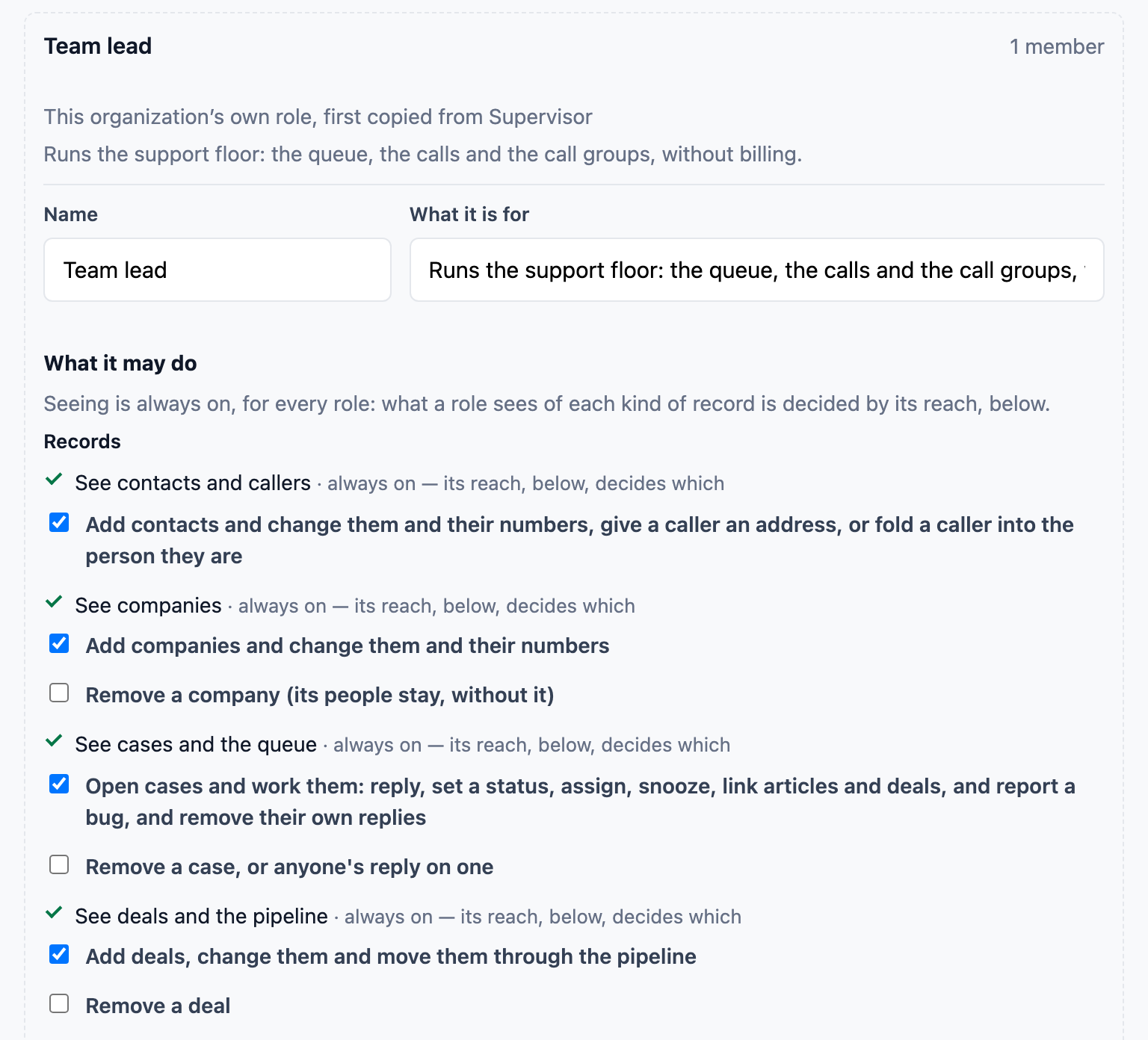
Start from thirteen ready-made roles, copy one into a role of your own, and choose what it can do and which records it can reach. Then see the product exactly as that role sees it.

Roles and access
The editor for a role Tallowquill Support made itself, Team lead, first copied from Supervisor: its name, the sentence saying it runs the support floor without billing, and what it may do, with each change or removal a box to tick.

Ready for a larger organization

Manager roles, each role’s areas, one record shared until a day you choose, an audit log, security alerts to Owners, support access only when an Owner allows it, and Trash with restore.

Security

Sequences started by what a customer does

A trial started, a plan changed, a feature used: each can start a series of emails that runs day by day and ends when its goal is reached.

Marketing

See billing and issue refunds from the case

Connect your own Stripe and see a customer’s plan, invoices and payments beside their case. Refund a payment or cancel a subscription from the case, within a limit an administrator sets, with every action on the customer’s timeline.

Sales

Pricing

Free for up to 3 people. Two paid plans when your team grows.

Every new organization starts with a 14-day trial of Plus, with no card. When it ends, a team of 3 people or fewer moves to Free by itself, and a larger team chooses Standard or Plus. There is no second trial.

Free for up to 3 people

Free

For a team of up to 3 people that sells, answers email and takes calls.

$0 for up to 3 people

No card, and no end date

Start free, no card
  • Up to 3 people, with no card
  • Contacts, companies and deals, with one pipeline
  • Cases and support email, with one support address
  • Tasks, notes, mentions and the timeline
  • Calling in the browser, through your own Twilio account
  • The thirteen ready-made roles, and scopes for who sees what
  • A help center and knowledge articles
  • Marketing email and segments: 500 emails a month to 500 marketing contacts
  • 1,000 contacts
Available after your trial

Standard

For a team of any size that sells, answers email and takes calls.

$29 per user a month, paid yearly

or $35 per user, paid monthly

Start free, no card
  • Everything in Free, and:
  • As many people as you need
  • Up to 5 Light members, who see and comment, at no charge
  • More contacts, pipelines and support addresses
  • Sequences, A/B tests and social posting
  • Lead scoring and call transcripts
  • No “Made with ContactRoll CRM” line
  • 2,000 marketing contacts

Founding customer pricing: the first 25 organizations to pay before founding pricing closes get 40% off for 12 months, then keep the price they started on for as long as the plan is paid without a break. Free organizations do not take a place. Calls are billed by Twilio to your own Twilio account, with no markup. Everything each plan includes

Questions

Can I sign up today?

Yes. Start free, with no card, at app.contactroll.com/signup. Every new organization gets a 14-day trial of Plus; when it ends, a team of 3 people or fewer moves to Free by itself.

Who is ContactRoll for?

For a small or growing team that sells to its customers, answers their email and takes their calls, and would rather do all of that in one product than in two or three. There is no limit on team size on Standard and Plus. A larger organization gets thirteen ready-made roles and roles of its own, who sees which records, an audit log, security alerts, support access only when an Owner allows it, Trash and restore, and Light members who see and comment at no charge.

What will it cost?

Free costs nothing for a team of up to 3 people, with no card. Standard is $29 and Plus $59 per user a month, paid yearly, or $35 and $69 paid monthly. Calls are billed by Twilio to your own Twilio account, with no markup from us.

Do I need a Twilio account?

Only for calling. Sales, support, notes and marketing email work without one. To make and take calls you connect your own Twilio account, and Twilio bills it directly.

Where is my data kept?

In the United States, protected by several layers of security. Call recordings stay in your own Twilio account. The security page explains how.

Start free

Start free, no card

Every new organization starts with a 14-day trial of Plus, with no card. When it ends, a team of 3 people or fewer moves to Free by itself, and a larger team chooses Standard or Plus. There is no second trial.

Start free, no card

A question first? Email us at

hello@contactroll.com

The people who build ContactRoll answer it. We use your message only to answer you, and we do not add you to any list.