Free resource
The small-team CRM buying checklist
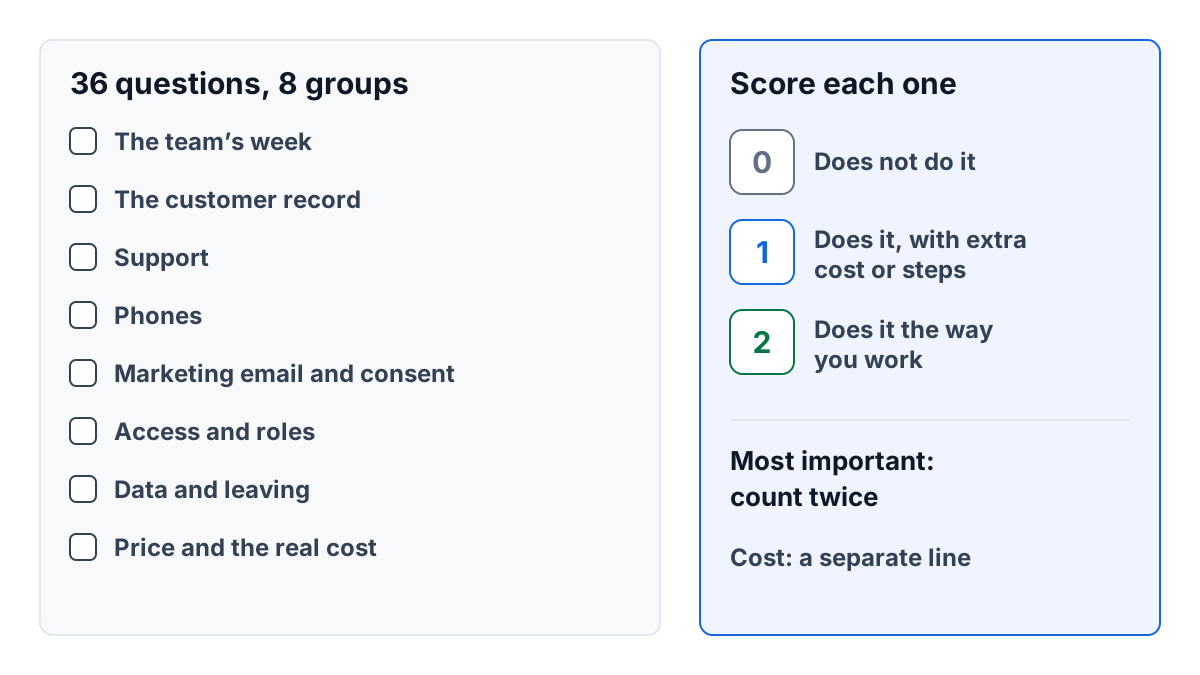
This is a checklist for a small team, from 10 to 25 people, choosing a CRM: the tool that holds your customers, what they have said to you, and what you are doing next with them. Print it, take it into every demo and every trial, and score each tool on the same questions.
It has 36 questions in eight groups. You will not need all of them. Cross out the ones that do not apply before you start, so a tool is not rewarded for things you will never use. If you want the thinking behind the questions first, read how to choose a CRM for a small team.
How to use it
- Write down your week first. Where customers reach you, who answers, and where the history lives now. Half an hour with the team is enough.
- Cross out what does not apply. No phones? Cross out that group.
- Mark the questions that matter most. Put a star beside five to eight of them. These count twice.
- Score during a trial, with your own data. Not from a sales page or a demo someone else drives.
- Work out the real yearly cost for your number of users, separately from the score.
The checklist
The team’s week
- Does it handle every channel customers use with you every week? A channel the tool cannot see is a channel whose history lives somewhere else.
- Can the person who answers the most work do their three most common jobs quickly? Time them in the trial; a minute a job is hours a week.
- Does it work for the people who are rarely at a desk? If some of your team works on the road, check how they would use it there.
- Can someone covering for a colleague pick up their work without asking? Holidays and sick days are when a shared tool earns its keep.
- Is it built for a team your size? Tools made for large sales departments often bring setup and reports you will pay for and never use.
The customer record
- Is there one record per person and per company? Several copies of one customer drift apart, and then no one trusts any of them.
- Do emails, calls, notes and deals all land on that one record? This is the whole point of a CRM for a small team.
- Do support and sales see the same history? The person chasing a renewal should know about last week’s complaint.
- Can you write a note on a record and mention a colleague? Otherwise the conversation about a customer moves to chat and is lost.
- Can you import your existing contacts from a spreadsheet? Check how it handles duplicates and people already in the tool.
Support
- Does each customer email become something with one owner? A shared inbox fails in two ways: two people answer, or no one does.
- Can you see who each message is waiting on, and for how long? Without a clock, the oldest message is the one no one notices.
- Are there saved replies for questions that repeat? They save time and keep answers consistent.
- Can you write notes that the customer never sees? Internal discussion must not end up in a reply by accident.
- Can a case be handed to a colleague with its history? The customer should not have to explain twice.
Phones
- Does a call from a known customer show who they are before you answer? It changes the first sentence of every call.
- Do calls appear on the customer’s record afterwards? A call log in a separate app is history no one else can see.
- Can calls ring a group of people, all at once or one at a time? Small teams share the phone; check it rings the way you work.
- Can you transfer a call, and talk to the colleague first? A caller who has explained a problem should not have to repeat it.
- If calls are recorded, is the caller always told? A caller should never find out afterwards; see telling callers a call is recorded.
Marketing email and consent
- Does it send marketing only to people who agreed to it? A customer who emailed support did not sign up for your newsletter.
- Does it keep a record of each person’s consent: what, when and how? You may one day need to show why someone was emailed.
- Do sign-up forms use double opt-in? It keeps typos, bots and other people’s addresses off your list. See double opt-in.
- Is unsubscribing one click, and honored immediately? Making it hard leads people to click “spam” instead.
- Can a person check each email before it goes? A mistake sent to your whole list cannot be taken back.
Access and roles
- Are there ready-made roles for the jobs on your team? Writing permissions from scratch is a job no one finishes.
- Can a role be limited to its own records, or its team’s? Useful when a part-timer or contractor joins.
- Can someone read everything without being able to change it? An accountant or an advisor often needs exactly that.
- Is there a record of who changed whose access? When something goes wrong, you will want to know.
Data and leaving
- Can you export everything, including notes, calls and files? Some exports contain only the contact list.
- Who on your team can run the export, without asking the vendor? Run it during the trial and open the file.
- What happens to your data if you close the account? Ask how long it is kept and when it is deleted.
- Where is the data held, and who at the vendor can see it? You will be asked this by your own customers sooner or later.
Price and the real cost for your team
- What is the price per user, paid monthly and paid yearly? The yearly figure is usually lower and commits you for longer.
- What do phones, extra tools and add-ons cost on top? Calling minutes and numbers are often billed separately.
- What does the whole team cost for a year, including the people you will add? Price the team you will have in twelve months, not today’s.
Scoring
Score each tool on each question you kept:
| Score | Meaning |
|---|---|
| 0 | Does not do it, or only with a workaround you would not keep up |
| 1 | Does it, but with extra cost, extra steps or a second tool |
| 2 | Does it the way your team works today |
Add up the scores. Count each starred question twice. The highest possible score is twice the number of questions you kept, plus twice again for each star.
Then read the result, don’t just total it. Two rules help:
- A 0 on a starred question is a stop. Look hard at whether you can live without it before going further with that tool.
- Put the yearly cost beside the score, not inside it. A few more points for twice the price is a choice to make deliberately.
To work out the yearly cost: price per user per month × number of users × 12, plus phone costs for a year, plus any other tool you would still need, plus a rough figure for the hours it will take to set up.
A worked example
Greenwick Gardens is a seven-person landscaping company. Rosa owns it, Kofi handles quotes and sales, Lena answers the phone and the office email, and four crew members work on site and only need to read job notes. They expect to hire one more person this year, so they price for eight users.
Rosa kept 20 of the 36 questions and starred six: one record per customer, emails and calls on that record, one owner for each email, a known caller shown before answering, export everything, and the real yearly cost. She compared two invented setups during a two-week trial.
Setup 1 is a sales-focused CRM plus a separate shared inbox and the phone company’s own app. Setup 2 is one tool that holds email, calls and deals, connected to a phone provider the company pays directly.
Their scores on the six starred questions:
| Starred question | Setup 1 | Setup 2 |
|---|---|---|
| One record per customer | 1 | 2 |
| Emails and calls on that record | 0 | 2 |
| One owner for each email | 2 | 2 |
| Known caller shown before answering | 0 | 2 |
| Export everything | 1 | 2 |
| Real yearly cost is clear | 1 | 2 |
| Starred total, counted twice | 10 | 24 |
On the other 14 questions, Setup 1 scored 20 and Setup 2 scored 23. Setup 2 lost points on one of them, a calendar of the crew’s jobs, and scored 0 there. Because Rosa had not starred that question, it did not stop her: the crew already keep their jobs in a scheduling tool they like.
| Score | Setup 1 | Setup 2 |
|---|---|---|
| Starred questions (counted twice) | 10 | 24 |
| Other questions | 20 | 23 |
| Total, out of 52 | 30 | 47 |
The two zeros on starred questions in Setup 1 were a stop on their own: Lena would still be searching the phone app’s call log and the inbox separately for every caller.
Then the cost, priced for eight users with invented figures: Setup 1 at $25 per user a month, plus $15 per user for the shared inbox, plus $120 a month for the phone company, comes to $5,280 a year. Setup 2 at $38 per user a month plus about $60 a month in phone minutes comes to $4,368 a year. Rosa also added a day of her own time to move the data in, the same for both.
Setup 2 scored higher and cost less, so the choice was easy. When it is not, the starred questions and the yearly cost are what you discuss; the total is only the start of the conversation.
Where ContactRoll fits
ContactRoll is one of the tools you might put through this list. It keeps contacts, companies, deals, support email and calls on one timeline per customer. Calls go through your own Twilio account, which bills you directly, and every member holds one of nine ready-made roles or, on Plus, a role of your own. The sales side of ContactRoll shows how the record and pipeline work.
Questions
How do I use this checklist?
Print it, cross out the questions that do not apply to your team, mark the ones that matter most, and score each tool 0, 1 or 2 on every question during a trial with your own data. Count the marked questions twice and compare the totals beside the real yearly cost.
Should the highest score always win?
No. A single 0 on a question your team relies on every week can rule a tool out on its own, and a tool that costs twice as much for a few more points is a decision to talk through, not an answer.