Guide
How to choose a CRM for a small team
Most small teams choose a CRM the same way: they open three pricing pages, compare the feature lists, and pick the one with the longest list they can afford. Six months later half the team still keeps notes in their inbox, because the tool was chosen for features no one uses and misses the one thing the team does every day.
A better way is to start from your team’s real week and work back to the questions that separate one tool from another. This guide gives you those questions, a simple way to score them, and a worked example. It works whichever tools you end up comparing.
Start from your team’s week, not a feature list
Before you look at any product, write down three things. It takes half an hour.
Where customers reach you. List every channel and roughly how much comes through each in a normal week: email to a shared address, calls to a main number, a contact form, text messages, chat on your website, social messages. Be honest about volume. A channel with two messages a month is not a reason to choose a tool.
Who answers. For each channel, who picks it up today, and who covers when they are out. In a team of eight, the same person often answers the phone, replies to a billing email and chases a sale before lunch.
Where the history lives now. When a customer calls, where does the person who answers look to see what happened last time? If the answer is “my inbox”, “the spreadsheet” and “ask Sam”, that is the problem a CRM is there to fix.
These notes are your requirements. Everything below is a way of testing tools against them.
The questions that separate tools at this size
Large companies buy CRMs with long requirement documents. A small team needs fewer questions, but they have to be the right ones. These are the ones that tend to split tools for teams of 10 to 25.
One record per customer, or several?
Many teams end up with one copy of a customer in the email tool, another in the phone system and a third in the sales pipeline. Each copy is a little different, and no one trusts any of them. Ask whether the tool keeps one record per person and per company, and whether everything about them (emails, calls, notes, deals) lands on it.
Do support and sales see the same timeline?
When the person chasing a renewal can see that the customer has had an open complaint for a week, they make a different phone call. Ask to see one customer’s history in the trial, with an email, a call and a deal on it, and check that everyone who needs it can read it.
What do the phones cost on top?
Calling is where prices hide. Some CRMs include calling minutes, some resell them with a markup, and some connect to a phone provider you pay separately. Work out the real monthly cost for your number of users and your usual minutes, not the price per user on the plan page.
Who can see and change what?
At eight people you may not think you need permissions. You probably do: a part-time bookkeeper who should see invoices but not change deals, or a new hire who should not be able to delete contacts. Ask what roles come ready-made and whether you can narrow what a role can reach.
How does your data leave if you go?
Every tool says you can export. Ask what the export contains (calls and notes, or only contacts), who on your team can run it, and whether it works without a support ticket. Then run it during the trial.
What does a normal week cost in clicks?
Take the three most common jobs from your notes — answering a customer email, taking a call from a known customer, moving a deal forward — and time them in each tool with your own data. A tool that adds a minute to each job adds hours to the team’s week.
List the needs that rule a tool out
Some needs decide the choice on their own, and the worst time to find a gap is after you have moved your customers in. Write down every channel your customers use with you each week, every place your team works from, and every report you send, and check each tool for them before you score anything else.
Score your options
Turn your notes into ten questions. Score each tool on each question:
| Score | Meaning |
|---|---|
| 0 | Does not do it, or only with a workaround you would not keep up |
| 1 | Does it, but with extra cost, extra steps or a second tool |
| 2 | Does it the way your team works today |
Mark the questions that matter most to your week and count them twice. With ten questions and five of them doubled, the most a tool can score is 30. Score from a trial with your own customers in it, not from the sales page, and keep cost as a separate line rather than a score.
If you want a longer list to choose your ten from, the small-team CRM buying checklist has 36 questions grouped by topic, with the same scoring method.
A worked example: an eight-person training company
Harbor Lane Training runs short courses for office teams. There are eight people: Nadia owns the business, Leo is the one sales lead, Grace handles support and bookings, and five trainers spend most of the week in classrooms. Customers email bookings@harborlane.example and call one shared number, 555-0142, which rings whoever is in the office.
Nadia wrote down a typical week. About 60 emails, mostly bookings and changes. About 40 calls, half of them from existing customers asking about a booking. Leo works roughly 20 open deals, usually renewals with companies that already send people on courses. History lives in Grace’s inbox, Leo’s spreadsheet and the phone’s call log.
She picked ten questions and doubled five of them: one record per customer, one timeline for support and sales, calls from a known customer showing who they are, the phone cost, and getting data out.
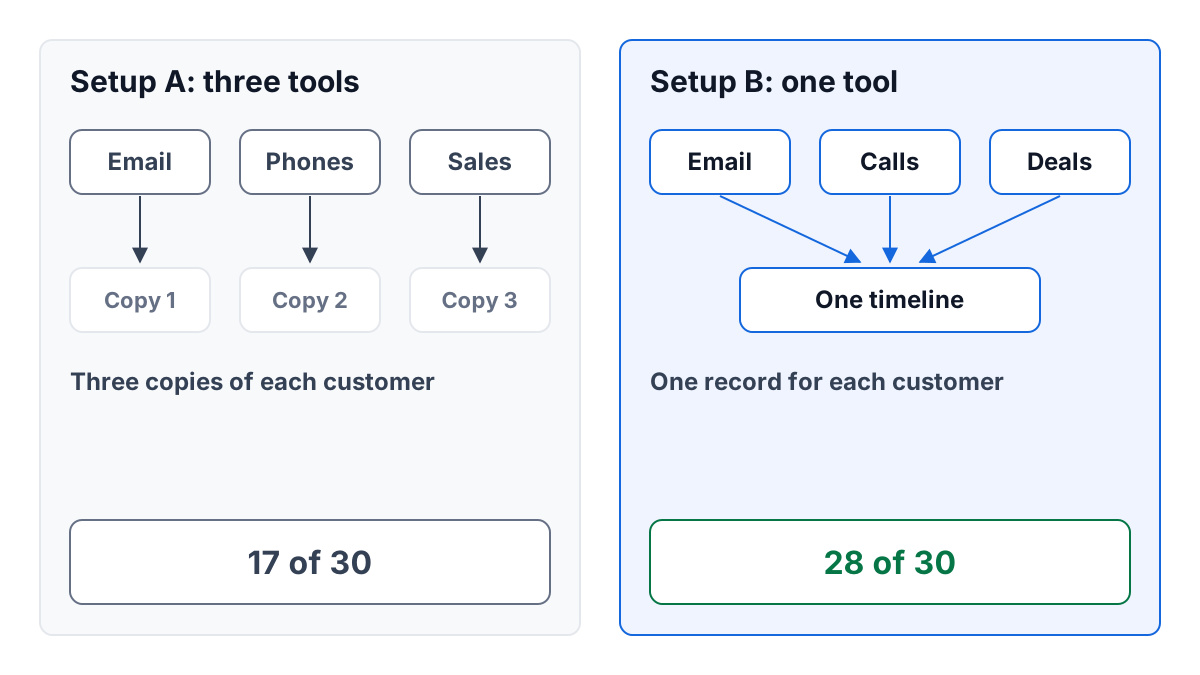
Setup A is three separate tools: a shared inbox for email, a phone service with its own app, and a sales pipeline tool. Setup B is one tool that holds email, calls and deals together.
| Question | Doubled | Setup A | Setup B |
|---|---|---|---|
| One record per customer | yes | 0 | 2 |
| Support and sales see one timeline | yes | 0 | 2 |
| A known caller shows who they are | yes | 1 | 2 |
| Phone cost is clear and fair | yes | 2 | 2 |
| Data can be exported in full | yes | 1 | 2 |
| Bookings email has an owner and a status | 2 | 2 | |
| Saved replies for common questions | 2 | 2 | |
| Roles for trainers who only need to read | 1 | 2 | |
| Trainers see their course calendar in it | 2 | 0 | |
| Leo’s renewal pipeline | 2 | 2 |
Setup A scores 4 on the doubled questions, which counts as 8, and 9 on the rest: 17 of 30. Setup B scores 10 on the doubled questions, which counts as 20, and 8 on the rest: 28 of 30.
The scores are not the decision. The one 0 in setup B matters: trainers would not see their course calendar in it. Nadia checked her notes and found that trainers already keep their courses in a booking calendar they like. If they did not, that row would have been doubled, and the gap would have been a real reason to choose differently.
She also worked out the cost for eight users in each setup, including the phone provider’s minutes, and set it beside the scores. A higher score that costs twice as much is a conversation, not an answer.
Run the trial like a real week
Whichever tools reach your shortlist, give each one a week with real work in it:
- Import a few dozen real customers, not sample data.
- Forward a day’s email into it and answer from it.
- Take real calls through it, if calling is one of your questions.
- Ask the person who will use it most to do the three common jobs, and watch.
- Run the export on the last day and open the file.
You will learn more from that week than from any comparison page.
How ContactRoll fits
ContactRoll keeps contacts, companies, deals, support email and calls on one timeline per customer, for teams of 10 to 25. Calls go through your own Twilio account, which bills you directly, and every member holds one of nine ready-made roles, or on Plus a role of your own. An Owner or Administrator can download everything the organization holds as a file. You can start free, with no card; see the sales side and the pricing, and read how a small team should handle support email for the support half of the same week.
Questions
What should a small team look at first when choosing a CRM?
Its own week: where customers write and call from, who answers, and where the history lives now. Those answers tell you which questions matter before you open any feature list.
How do you compare two CRMs fairly?
Write ten questions from your week, score each tool 0, 1 or 2 on each, and count the questions that matter most twice. Score from a trial with your own data, not from a sales page.