Guide
How a small team should handle support email
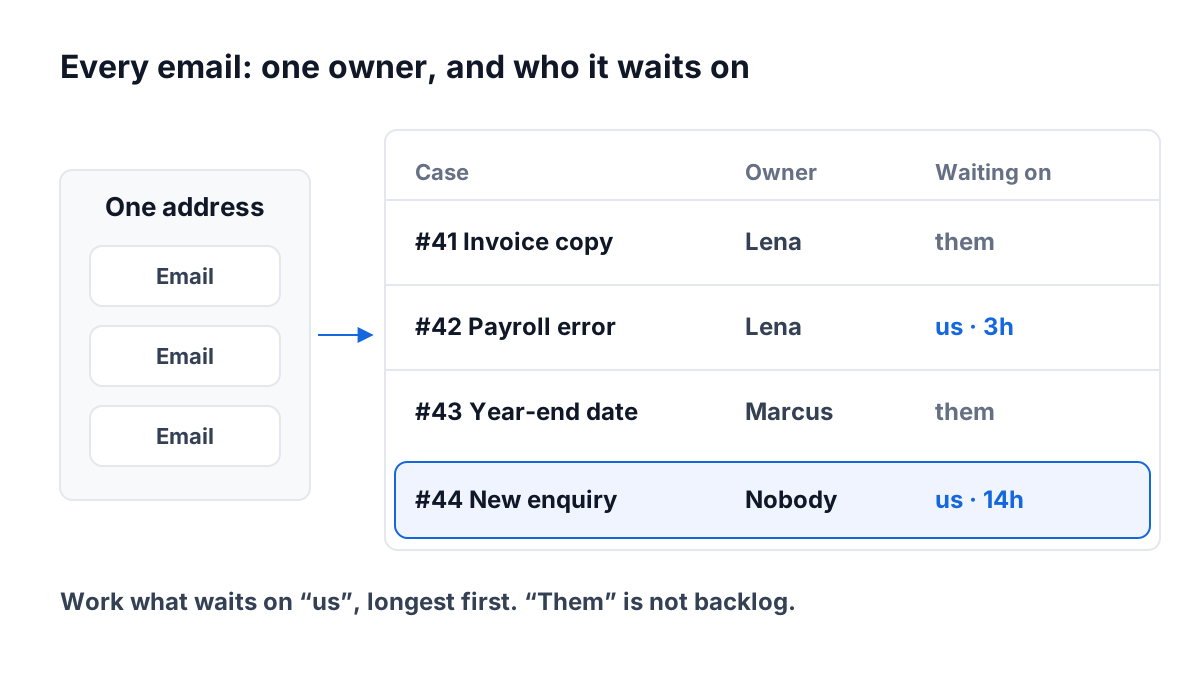
Most small teams start support the same way. One address, such as help@ or support@, goes to a shared inbox, and everyone can see it. It works while there are five emails a day and two people who sit next to each other. Somewhere around twenty emails a day, it starts to fail, and it fails quietly.
This guide sets out a method that works in any tool: a shared inbox, a help desk, or a CRM. It comes down to four habits and two kinds of help. Then it walks through one morning at a small firm so you can see the habits at work.
The two ways a shared inbox fails
A shared inbox has two failures, and they are opposites.
Two people answer the same message. Both saw it, both thought it was theirs, and the customer gets two replies that do not quite agree. One says the invoice will be fixed today, the other asks for a copy of it. The customer now trusts neither.
No one answers. Everyone saw it, and everyone assumed someone else had it. The email sits read, so nothing about it looks new. A week later the customer writes again, less politely.
Both failures have the same cause. A message in a shared inbox belongs to everyone, which means it belongs to no one. The fix is not more effort. It is a rule about ownership, and two pieces of information next to every message.
The method: four habits that work in any tool
1. Every message becomes a case with one owner
Treat each customer email as a case: a piece of work with a start and an end. The first thing that happens to a case is that it gets an owner. Not a reply, not a forward, an owner.
The rule is short. If a case has no owner, the next person who opens it takes it. If it already has an owner, you leave it alone unless you are asked. A case that has an owner can still be helped by others, but only one person writes to the customer.
In a plain shared inbox you can do this with labels or folders named for each person. In a help desk or CRM it is usually an owner field. Whatever the tool, the owner must be visible from the list, without opening the message.
2. A status that says who it is waiting on
“Open” and “closed” are not enough. The question your team asks all day is: whose move is it?
Every open case is waiting on one of three parties:
| Waiting on | What it means | What to do |
|---|---|---|
| Us | The customer wrote last | Someone on the team owes a reply |
| Them | We wrote last and asked something | Nothing, until the customer writes |
| Nobody | It is resolved | Close it |
This one column turns a pile of messages into a to-do list. Your team only has to look at the cases waiting on “us”. The cases waiting on “them” are not backlog, even if they are old. A good tool works this out from who wrote last, so no one has to remember to update it.
3. A clock that counts the customer’s wait
Next to every case waiting on your team, show how long the customer has been waiting. Count from the moment they last wrote, not from when the case was opened. A case opened ten days ago where the customer replied this morning has been waiting for hours, not days. A case opened yesterday that no one has touched has been waiting a full day.
Sort by that clock, longest first. The case at the top is the one most likely to become a complaint. If you want to set a target for how fast you reply, see how fast a small team should reply to email.
4. Close what is done
A case stays open until the customer’s problem is solved, then it is closed. Do not leave cases open “just in case”. An open case that no one owes anything on hides the ones that do need work. If the customer writes again about the same thing, the case can be reopened, or a new one started.
Two kinds of help
Saved replies for the questions that repeat
Look at a week of support email and you will find the same five or six questions again and again: how do I reset my password, where is my invoice, can I change my plan, when will the bug be fixed. Write one good answer to each, and save it where the whole team can reach it.
A saved reply is a starting point, not a form letter. Fill in the customer’s name, change a sentence to fit, and send. Keep a few blanks in it on purpose, such as the date or the amount, so no one sends it without reading it. Our free set of support email templates is a place to start.
Internal notes the customer never sees
The team needs to talk about a case: “I think this is the same problem Ella had last month,” or “Check with Tom before refunding.” That talk must never end up in the reply. Forwarding the customer’s email around the office is how it does.
Keep notes next to the case, in a place that is clearly not the reply box. Anyone on the team can read them, and the customer never can. If your tool cannot do this, keep a shared document per customer and link it, but never discuss a customer in a reply draft.
Handing a case over
People go on vacation, get sick, or end their day before a case does. A case needs a way to change owners cleanly. The person handing it over writes one note: what the customer asked, what has been done, and what is next. Then the owner changes, and the new owner knows they have it.
What you must not do is leave the case with someone who is away. An owner who is not working is the same as no owner.
One morning at a four-person bookkeeping firm
Here is how it looks in practice. A made-up bookkeeping firm has four people: Rosa, who runs it, and Tom, Lena and Marcus, who look after clients. Clients write to one address, about thirty emails a day.
At 8:45 on a Tuesday, there are nine new messages from overnight. Each one has already become a case, unowned, in a queue sorted by how long the customer has waited.
Tom takes the first three. They are from his own clients, so he sets himself as owner on each. No one else will touch them now.
Two are the same question. Jamal and Grace both ask where to find last month’s invoice. Lena takes both and uses the saved reply for it. She fills in each first name, adds the month, reads it once and sends. Both cases now wait on “them”: if the customer writes back, they jump back into the list.
One needs the customer. A client, Ken, wants his accounts closed early but has not said which date. Marcus owns it and asks for the date. It now waits on “them”, and it drops out of the team’s to-do list without being forgotten.
One needs a colleague. A client asks about a payroll error. Lena owns it but wants Rosa’s view, so she leaves an internal note on the case asking her. The customer sees nothing of this. Rosa answers in a note within the hour, and Lena replies to the client.
One that no one has touched. At 11:00 Rosa looks at the queue. One case at the top is still waiting on “us”, and the clock beside it says 14 hours. It arrived at 9 PM the night before from a client no one looks after in particular, so no one took it. Rosa takes it herself and replies. Without the clock, it would have looked like any other read email.
Tom is out on Thursday. On Wednesday afternoon he hands his two open cases to Marcus, each with a note: what the client asked and what he has told them. Marcus owns them from that moment.
Nothing here is clever. Every case has one owner, the list shows whose move it is, and the clock shows the case that slipped.
What to set up this week
- Pick one address for support, and stop answering support from personal inboxes.
- Decide how a case shows its owner, and make it visible in the list.
- Agree on the rule: an unowned case is taken by whoever opens it.
- Add “waiting on” to every open case, and look only at “us” when you work the queue.
- Show how long each case has waited, counted from the customer’s last message, and sort by it.
- Write saved replies for your five most common questions.
- Agree on where internal notes live, and never put them in a reply.
- Agree on how to hand a case over: a note, then a new owner.
How ContactRoll does it
In ContactRoll, a new email to your organization’s ContactRoll address opens a case in the queue, and the customer’s replies land on the same case. A case has an owner, and the queue’s “Waiting on” column reads, for example, “us” with the time since the customer last wrote, “them”, or a dash when it is waiting on no one. Views above the list show your own cases, cases no one owns yet, and cases that need a reply. Saved replies are in the reply box. Notes go on the case’s timeline, never to the customer, and you can hand a case to a colleague or a team with a note. You can start free, with no card.
Questions
How do you stop two people answering the same support email?
Give every message one owner before anyone writes a word. Whoever opens an unowned message takes it first, and everyone else leaves a message that already has a name on it.
What should a support queue show for each email?
Three things: who owns it, who it is waiting on (your team, the customer, or nobody), and how long the customer has waited if it is waiting on your team.
Where should the team talk about a customer’s email?
In internal notes kept beside the conversation, never in the reply itself. A note is for the team; the customer only ever sees what was written to them.