Guide
What is a ring group, and how should it ring?
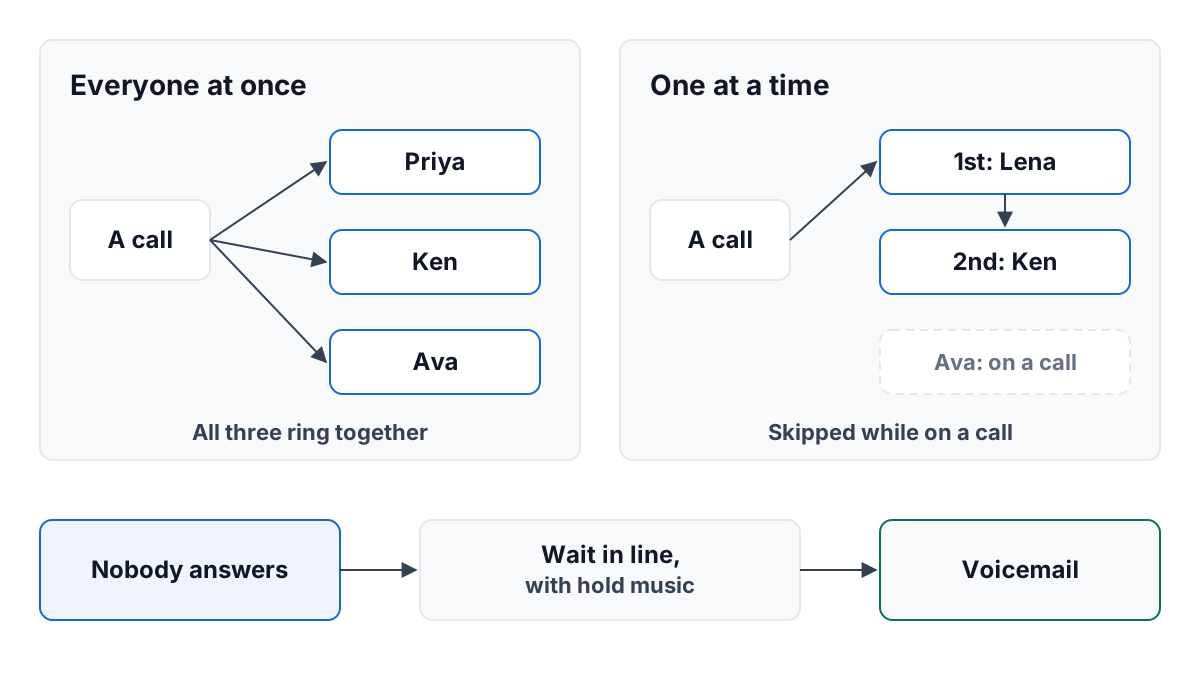
A ring group is a set of people who share incoming calls. Instead of a number ringing one desk, it rings a group — Front desk, Billing, On call — and whoever is in that group can answer. Phone systems call it different things: a ring group, a hunt group, a call group. ContactRoll calls it a call group. The idea is the same.
For a small team, ring groups are what make one phone number feel like a business rather than a person. The customer dials one number; the right two or three people hear it.
This guide covers the two ways a group can ring, when each suits a small team, and what should happen when everyone is busy. The worked example is a five-person dental office we made up.
Two ways to ring
Everyone at once
Every person in the group rings at the same moment, and the first to pick up gets the call. You may also see this called “ring all” or “simultaneous ring”.
It suits a group where:
- anyone can help, so it does not matter who answers;
- speed matters more than fairness, as with a new customer who may hang up and call a competitor;
- the group is small, so a ringing call does not interrupt a whole room.
Its cost is noise. Every call interrupts everyone in the group, even the people who were about to start something else. In a group of eight, that adds up.
One at a time
The call rings one person for a set number of seconds, then the next, then the next. You may see this called “sequential ring”, “round robin” or a “hunt group”.
There are two common orders:
- A fixed order. The same person is always tried first. Useful when one person is the natural first answer and the others are backup.
- Longest idle first. Whoever has gone longest without a call is tried first. This shares calls out fairly over a day without anyone keeping count.
It suits a group where:
- you want calls spread evenly, so no one spends the whole day on the phone;
- the people in the group are doing other work, and only one should be pulled away at a time;
- callers will wait a few extra seconds without hanging up, as existing customers usually will.
Its cost is time. If the first two people do not answer, the caller has heard a minute of ringing before the third is tried. Keep the seconds per person short — about half a minute is plenty — and the group small.
Which to choose
A simple rule: if losing the call costs you a sale, ring everyone at once. If the call will wait and you care about sharing the load, ring one at a time.
| Question | Everyone at once | One at a time |
|---|---|---|
| How fast is the call answered? | As fast as anyone can reach a phone | Slower if the first person is away |
| How many people are interrupted? | Everyone in the group | One at a time |
| Is the work shared fairly? | Not by itself | Yes, with longest idle first |
| Best for | New inquiries, urgent lines | Billing, existing customers, support |
Never ring someone already on a call
A person on a call cannot answer a second one. If your system rings them anyway, the call waits on a phone no one can pick up, and in a one-at-a-time group it wastes that person’s whole turn. Most systems can skip anyone already on a call. Make sure yours does. It is the difference between a caller reaching a free receptionist in five seconds and hearing thirty seconds of ringing first.
The same goes for people who are not working: out at lunch, on leave, at a job site. A ring group should ring only the people who are actually there to answer. Some systems do this by asking each person to mark themselves as available.
When everyone is busy
Sooner or later every person in the group will be on a call at once. Decide in advance what happens then. There are three choices, and the best setups use them in this order.
- A line to wait in. The caller hears a short sentence — “Everyone is busy at the moment. Please hold, and the next available person will take your call.” — and then hold music. The first person to come free is put through.
- A limit on the wait. Set the longest a caller waits in line. Two to five minutes is reasonable for a small team. Past that, most callers would rather leave a message than keep holding.
- Voicemail. After the limit, the caller is offered voicemail. Make sure someone owns the messages, so they are returned the same day.
A line is not always right. For a group where callers will not wait, such as an urgent on-call line, skip the line and go straight to voicemail, or better, to a second group.
The worked example: a dental office front desk
Wrenmoor Dental has five people. Priya, Ken and Ava are the receptionists. Lena is the office manager, who also handles billing questions. The dentist, Omar, does not take calls.
They set up two groups.
New patients holds Priya, Ken and Ava, and rings everyone at once. A new patient is often comparing two or three offices, and the first to answer usually gets the booking. Whoever is free picks up. If all three are on calls, the caller waits in line for up to three minutes with hold music, and then can leave a message.
Billing holds Lena first, then the three receptionists, and rings one at a time. Billing calls can wait a few seconds, and Lena knows the answers, so she is the natural first try. If she is with a patient, the call moves on to a receptionist, who can take a message or look up a balance.
Their phone menu sends key 1 (“To book an appointment as a new patient”) to New patients and key 2 (“For a question about a bill”) to Billing. The guide to setting up a phone menu covers how to write keys like these.
After a month, Lena noticed the receptionists were taking most of the billing calls because she was often away from her desk. That was fine: the calls were answered. If it had not been, she could have stayed in Billing but moved the receptionists to a second group the menu rang only after her.
A short checklist
- Name each group for what its callers want: New patients, Billing, On call.
- Keep groups small. Three to five people is plenty for most small-team groups.
- Choose everyone at once or one at a time for each group, not for the whole office.
- Make sure people on a call, or not working, are not rung.
- Decide the line, its longest wait, and who owns the voicemails.
- Call each group yourself while everyone in it is busy, and listen to what a caller hears.
How ContactRoll does it
In ContactRoll a call group rings Everyone at once, for 25 seconds, or One at a time — whoever has been idle longest first, 30 seconds each, then the next. It has no fixed order, so in the example Lena would be tried first only when she had been idle longest. A member is rung only while they have switched on Taking calls, and never while they are on a call. A group can keep callers in line for up to ten minutes with your chosen hold music, then offer voicemail, and a missed call or voicemail opens a case in that group’s queue for anyone in it to take. A returning customer can also ring the person who looks after them first, for a few seconds — see routing calls to the account owner. There is more on calling in ContactRoll.
Questions
What is a ring group?
A ring group is a named set of people who share incoming calls, such as Front desk or Billing. A number, or a key on a phone menu, rings the group instead of one person.
Should a ring group ring everyone at once or one at a time?
Ring everyone at once when speed matters most and anyone in the group can help. Ring one at a time when you want calls shared out fairly or want to spare the rest of the team the interruption.
What happens when everyone in a ring group is busy?
A good setup lets the caller wait in line with something to listen to, puts them through to the first person who is free, and offers voicemail after a set number of minutes.