Guide
Double opt-in email: what it is and how to set it up
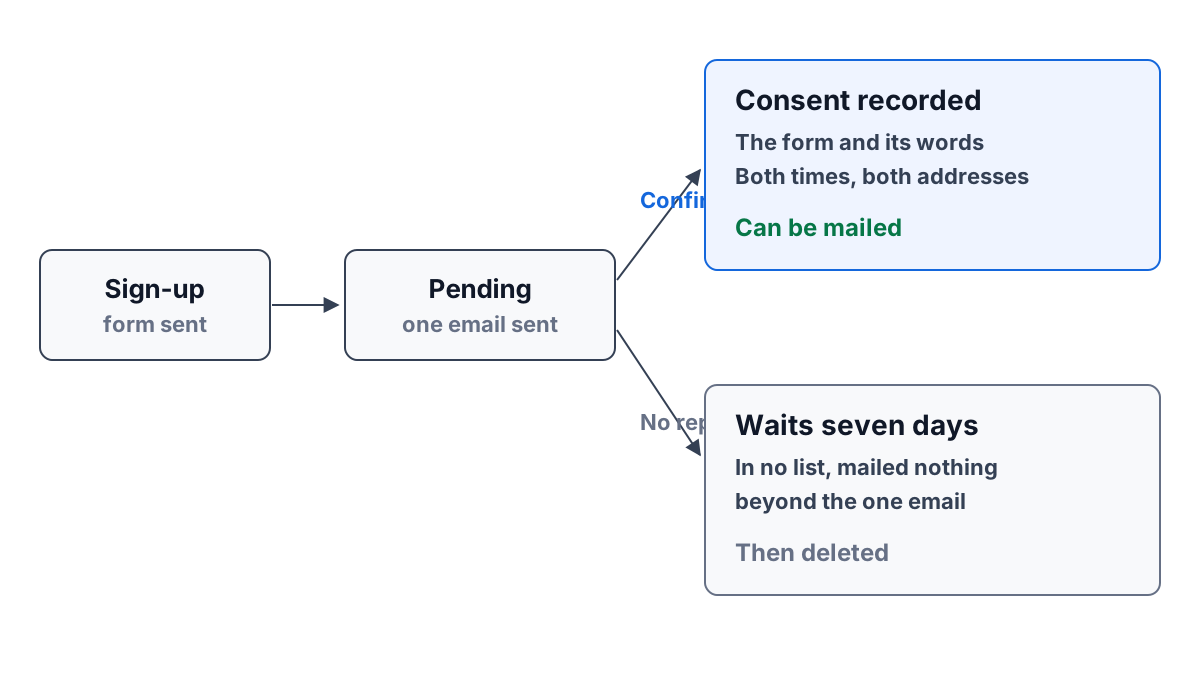
A sign-up form on your website is the best source of email subscribers a small business has. People choose to hear from you, in their own words, at the moment they are interested. It is also the easiest place to collect addresses you should not be mailing: typos, fake addresses, bots, and people signed up by someone else.
Double opt-in is the simple fix. This guide explains what it is, what the confirmation actually proves, what to keep as a record, and what to do with the sign-ups no one confirms. It works with any email tool.
Single opt-in and double opt-in
Single opt-in means an address typed into a form goes straight onto your list. The next newsletter goes to it.
Double opt-in (also called confirmed opt-in) adds one step. After the form is submitted, the address is sent a single email asking the person to confirm. Only when they click the confirm link or button do they join the list. Until then they get nothing else from you.
Single opt-in collects more addresses. Double opt-in collects addresses that work and belong to people who asked. For a small business that sends to hundreds of people rather than millions, the second matters more: every bounce and every spam complaint counts against your sending reputation, and a list full of mistakes is a list that lands in spam folders.
What the confirmation email proves
The confirmation proves one thing: the person who controls that inbox wanted to sign up.
That rules out the common problems. A typo such as a missing letter in the domain never confirms, because no one receives the email. A bot filling in forms rarely reads its mail. Someone who types a colleague’s or an ex-partner’s address cannot confirm for them.
It does not prove anything more. It does not tell you what they agreed to receive, or when. That is the job of the record you keep.
One detail worth getting right: confirm on a button click, not on a link being opened. Many mail systems scan the links in incoming email before a person sees it. If opening the link confirms the sign-up, a scanner confirms it for them. A link that opens a page with a “Confirm” button avoids that, because scanners fetch pages but do not click buttons.
What to keep as a record of consent
When someone confirms, keep a record that would answer “why are we emailing this person?” a year from now. At minimum:
- Who: the email address and the name they gave.
- What they agreed to: the exact words beside the checkbox at the time, and a link to the privacy policy that was on the form.
- When: the time they submitted the form and the time they confirmed.
- How: which form or page they used, and the network address each step came from.
- Whether they withdrew: if they later unsubscribe, the date, kept beside the original record.
Keep the words as they were. If you change the checkbox text next spring, last year’s subscribers agreed to last year’s words.
This is not legal advice, and the rules differ by country. For one regulator’s view, the UK Information Commissioner’s Office explains what a consent record should show — who, when, what they were told, how they consented, and any withdrawal — in its guidance on how to obtain, record and manage consent (read 2026-10-09). If you sell into several countries, ask someone qualified in each.
Why a support contact is not a marketing contact
Here is a mistake that is easy to make once all your customers live in one tool. Someone emails your support address about a late delivery. They are now a contact, with an address, in the same place as your subscribers. It is tempting to add every contact to the newsletter.
Don’t. They gave you their address so you could answer their question, not so you could send them offers. Treat “is a contact” and “agreed to marketing email” as two separate facts. Only the second one, with its record, puts a person on a marketing list. The same goes for people you meet at an event or who appear on an invoice: if they want your newsletter, send them to the form.
Setting up a double opt-in form, step by step
Whatever tool you use, the steps are the same.
- Write the checkbox in plain words. Say what they will get and roughly how often: “Send me the roastery’s newsletter, about twice a month. I can unsubscribe at any time.” Leave the box unticked.
- Link your privacy policy beside it. One sentence and a link is enough.
- Ask for little. An email address and a first name. Every extra field costs sign-ups.
- Add a hidden field for bots. A field that people never see but form-filling bots often complete. A submission with it filled in is quietly ignored.
- Write the confirmation email. One sentence on what they signed up for, one button, and a line saying that if they did not sign up they can ignore the email and will hear nothing more.
- Decide how long a sign-up waits. Pick a period, such as a week, after which an unconfirmed sign-up is deleted.
- Test it yourself with a real address of your own, then with a mistyped one, and check that only the first ends up on the list.
What happens to sign-ups no one confirms
Some people never confirm. They change their mind, the email lands in a folder they never check, or the address was never theirs.
An unconfirmed sign-up should be mailed nothing except the one confirmation, appear in no list or audience, and be deleted when its waiting period ends. Keeping them “just in case” turns a careful list back into a guess, and holds personal details about people who never agreed to anything.
A worked example: a small coffee roaster
Fernhollow Roasting is a four-person coffee roaster. Tom, the owner, adds a sign-up form to the shop’s website so customers can hear about new coffees. The checkbox reads “Email me when a new coffee is roasted, about twice a month,” with the shop’s privacy policy linked beside it.
On a Tuesday morning two visitors fill it in.
Mia types mia@inbox.example, ticks the box and clicks Sign up. A minute later the confirmation arrives. She clicks Confirm on the page it opens. The record now says: signed up on the roastery’s sign-up page at 9:12, ticking “Email me when a new coffee is roasted, about twice a month,” confirmed from the emailed link at 9:14, with the network address of each step. She is on the list, and the next newsletter goes to her.
Owen types owen@inbx.example, a mistake in his own address. The confirmation goes nowhere he will ever see it. His sign-up waits, marked as not confirmed, in no list. Seven days later it is deleted along with the contact it created. He was never sent a newsletter.
Three weeks later Mia unsubscribes with one click from a newsletter. Her consent record stays, now with the date she withdrew, and she gets nothing more.
How ContactRoll does it
ContactRoll’s sign-up forms work this way. Each organization gets a hosted page and a plain HTML snippet for its own website. The form has the consent box in your own words, your privacy policy linked, and a hidden field for bots. A submission makes a pending sign-up and sends one confirmation; its link opens a page with a button, so a mail scanner confirms nothing. Clicking the button records consent with the form, both times, both network addresses and the words agreed to. A sign-up no one confirms is in no list or segment. It is deleted after seven days, and so is the contact it created, unless something else refers to that contact. Marketing email goes only to people with recorded consent, and every message carries one-click unsubscribe. See marketing in ContactRoll, and for the other side of keeping customers’ trust, read how to choose a CRM for a small team and telling callers a call is recorded.
Questions
What is the difference between single and double opt-in?
With single opt-in, an address typed into a form goes straight onto your list. With double opt-in, the person is sent a confirmation email and only joins the list once they confirm from their own inbox.
What does a confirmation email prove?
That the person who controls the inbox wanted to sign up. It does not prove anything else, so you still keep a record of what they agreed to, when and how.
What should happen to a sign-up no one confirms?
It should never be mailed anything but the one confirmation, and it should be removed after a set time. In ContactRoll an unconfirmed sign-up is deleted after seven days.