Guide
A help desk and a CRM in one tool: what a team of 10 to 25 gains
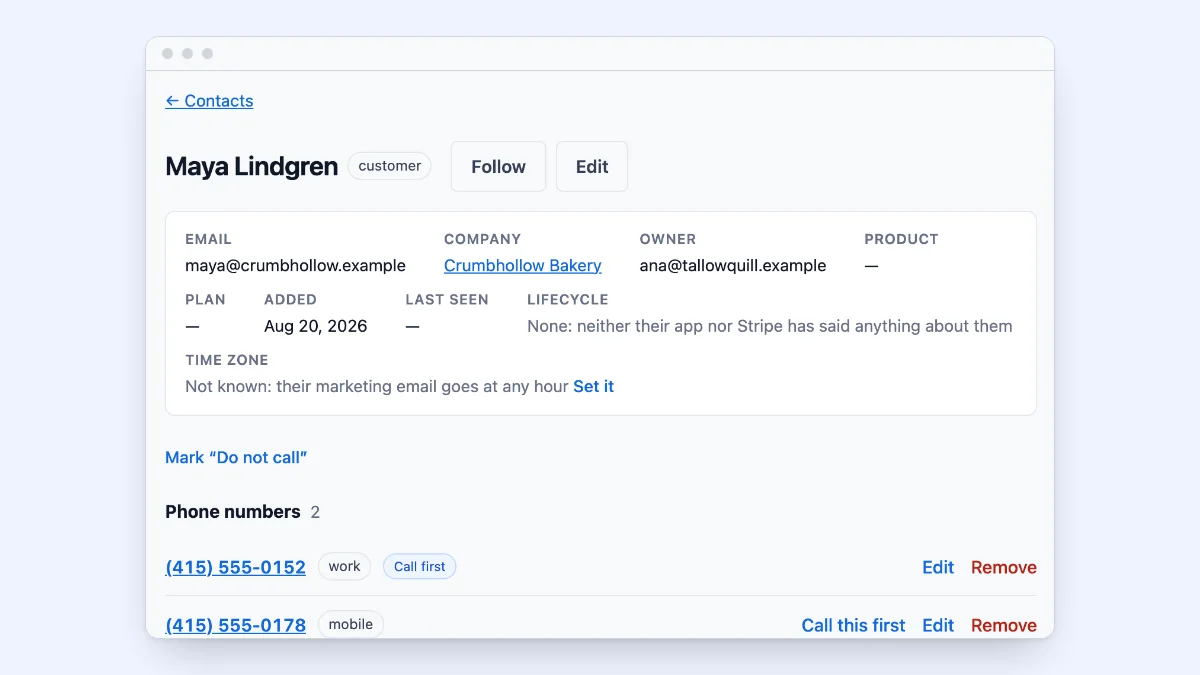
A team of 10 to 25 people usually starts with two tools that each think they own the customer. The help desk knows what the customer asked. The CRM knows what they bought and what they might buy next. Neither knows what the other knows, so somebody copies a name, an email address and a note from one to the other, or nobody does and a salesperson calls a customer whose support case has been open for a week.
This guide sets out what changes when the two are one tool, what you give up, and what to check before you choose one.
What a help desk does, and what a CRM does
A help desk turns the email your customers send to a support address into cases (some tools call them tickets) that a team shares. Each case has a status, an owner and a history, and the queue shows what is waiting and for how long. Good help desks add saved replies, an article library and reply targets.
A CRM keeps the people and companies you do business with, the deals you are working on, and the tasks and notes around them. Its center is the record of each customer and the pipeline of deals.
The overlap is the customer. Every case is from a person who is also a contact, at a company that may also have a deal.
What one tool gains a team of 10 to 25
One record of each customer. A support case, a call, a deal and a note sit on the same timeline. The person who answers the phone sees the open case before saying hello; the person selling sees last week’s complaint before sending a renewal quote.
No copying between tools. A customer who emails support is already a contact. A change of email address or phone number is made once. Nobody keeps a spreadsheet of which help desk user matches which CRM contact.
One set of permissions. Roles decide once who sees which customers. Two tools mean two sets of users, two sets of roles and two places to remove somebody who leaves.
One bill, one sign-in. Each person has one seat, not one in each tool. For a team where most people both sell and answer customers, that is the larger saving.
Reports that join up. How many support cases a customer opened before they renewed is one question, not an export from each tool and a lookup in a spreadsheet.
What you give up
A combined tool is not the deepest help desk or the deepest CRM on the market. Ask what you would miss:
- Scale features. Help desks built for hundreds of agents offer things a team of 15 rarely uses: many brands in one account, skills-based routing across dozens of queues, workforce scheduling.
- A marketplace. The large CRMs have hundreds of add-ons. Check that the few you rely on (accounting, a calendar, your own app) can connect through an API or webhooks.
- Habits. A team used to one tool’s screens takes a week or two to settle into another. Move one part of the work at a time if you can.
If none of these is a requirement today, the gain of one record usually outweighs them for a team this size.
What to check before choosing a combined tool
- A real support queue. Each email opens a case with an owner and a status, and replies from the customer join their case. The queue shows who each case is waiting on, you or the customer.
- Reply targets in business hours. A first-reply and next-reply target, counted in your team’s hours, with the case showing how long is left.
- Notes the customer never sees. Internal notes and mentions of a colleague, kept apart from the reply, so an aside never reaches the customer.
- Deals beside cases. A pipeline of deals that can be linked to the customer’s support cases.
- Calls on the same record. If your team talks to customers by phone, calls should land on the same timeline as email, and a call that comes in should open a case like an email does.
- Roles that narrow what people see. A salesperson may need to see cases without working them; a new hire may need to see only their own customers.
- Your data out, any time. An export of everything, without a request to the vendor.
Where ContactRoll fits
ContactRoll is a CRM, a help desk and a phone system in one product, made for teams of 10 to 25. Support email arrives as cases in one shared queue, and each case says who it is waiting on. Contacts, companies and deals sit beside the cases, with every email, call, case, deal and note on one timeline of each customer. Calls are placed and answered in the browser through your own Twilio account, and each call that comes in opens a case. Nine ready-made roles decide who may do what, each narrowed to its own records or its team’s if you choose.
Every feature is listed on the features page, with the plan it is on, and the prices are on the pricing page. Free covers up to 3 people; Standard and Plus are priced per user.
Moving from two tools to one
- Start with the customers. Export contacts from your CRM as a CSV file and import them first, so the people who email support are already known.
- Point your support address at the new tool. Forward the address your customers already use; new email opens cases there.
- Leave old tickets where they are for a while. Close what you can in the old help desk, and answer new email in the new one. After a few weeks the old queue is empty.
- Set the roles before you invite the team. Decide who sees everything and who sees their own, then invite people into the right role.
- Move calls last. Once email and records are settled, connect the phone so calls land on the same records.
A combined tool pays off when the same customers buy, ask and call. For most teams of 10 to 25, that is every customer.
Questions
Can one tool be both a help desk and a CRM?
Yes. A help desk turns support email into tickets or cases a team can share; a CRM keeps people, companies and deals. A tool that does both keeps one record of each customer, so a support case and a deal sit on the same timeline. Check that the help desk half has a real queue, with owners, statuses and reply targets, and not only an inbox attached to contacts.
When should a small team keep separate help desk and CRM tools?
When support and sales never talk to the same customers, or when one side needs something only a specialist tool has, such as a help desk with hundreds of agents across many brands. For a team of 10 to 25 where the same customers buy, ask questions and call, two tools usually means two copies of each customer.
What does a combined help desk and CRM cost?
It depends on the vendor and plan. ContactRoll is free for up to 3 people, and $29 or $59 per user a month paid yearly on Standard and Plus, with the help desk, the CRM and calling in every plan. Separate tools are priced one by one: add each per-seat price for each person who uses it.