Guide
Roles and permissions in a CRM for a team of 10 to 25
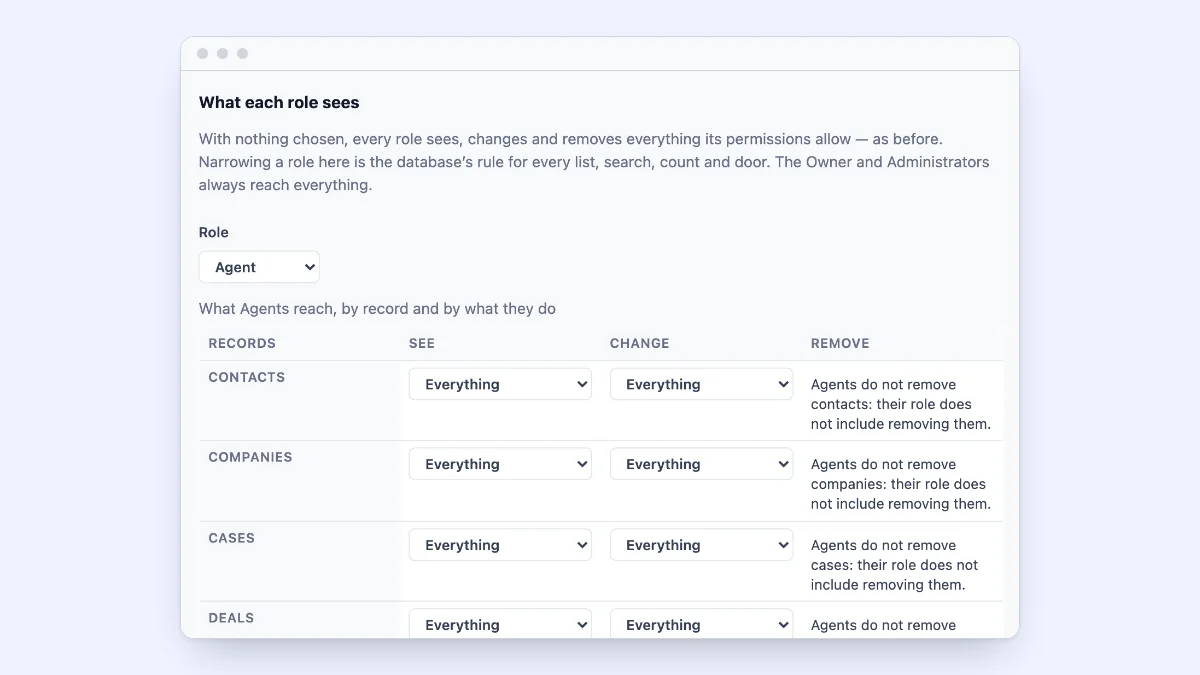
At five people, everyone sees everything and nobody minds. At fifteen, a new hire can delete a pipeline stage, a salesperson’s accounts sit beside everyone else’s, and the person who only needs the monthly numbers can change any customer. Roles are how a growing team decides who may do what, before a mistake decides it for them.
This guide covers the roles a team of 10 to 25 needs, when to narrow what people see, and how to set it up without making it a project.
Two questions: what may they do, and to which records?
A role answers what a person may do: answer cases, move deals, send marketing email, change settings, export data. A scope answers which records they may do it to: every customer, their team’s, only their own, or none of one kind.
Keep the two apart. Most problems with permissions come from making a new role for every combination of “what” and “which”, until nobody remembers what each one is for.
The roles most teams of 10 to 25 need
- Owner. One person who can do everything, including billing and closing the account.
- Administrators. One or two people who set up the tool: users, roles, phone numbers, integrations.
- Support. Answer cases, see customers, log calls; no settings.
- Sales. Work contacts, companies and deals; see a customer’s cases without working them.
- Marketing. Draft emails and build audiences, with a person who approves before anything is sent.
- Read-only. See records and reports, change nothing. Good for a manager who only needs the numbers, or an accountant.
That is five or six roles. If your tool comes with ready-made roles close to these, start there.
When to narrow what people see
Seeing every customer is the right default for most small teams: it is how a colleague picks up a case when someone is out. Narrow it when you have a reason:
- Salespeople with their own accounts, who should work only their own deals and contacts.
- Teams by region or product, who should see their team’s customers and the unassigned ones waiting to be picked up.
- New hires, for their first weeks.
- Contractors, who should see only what they work on.
Narrow by owner and by team, not customer by customer. A rule like “sees their team’s contacts and unassigned ones” stays true as people and customers come and go; a hand-made list of customers does not.
Fields that not everyone should see
Some fields belong to a few people: a contract value, a discount, a personal note about a customer. Hide those fields from the roles that do not need them, or let a role see them without changing them, rather than making a separate role for each case.
Five checks before you invite the team
- One owner, and a second administrator, so the team is never locked out when one person is away.
- Nobody can give themselves more access than their own role has.
- Preview a role before giving it to someone: look at the tool as that role sees it.
- Removing someone is one step. When they leave, their records stay and are given to someone else.
- There is a record of changes: who changed whose role, who exported data, who signed in.
Where ContactRoll fits
ContactRoll has nine ready-made roles on every plan, Free included: Owner, Administrator, Supervisor, Agent, Sales, Marketer, Billing, Knowledge editor and Read-only. Each role’s reach can be narrowed per kind of record to everything, its team’s, its own or none, with or without unassigned records. For each custom field and each role, you choose whether the role sees and changes it, only sees it, or does not see it at all. An audit log shows sign-ins, role changes, exports and settings changes.
On Plus, you can make roles of your own from a copy, changing them permission by permission, and use “View as” to see ContactRoll as a role sees it before you give it to anyone. Nobody can make a role with more access than their own.
See every feature with the plan it is on, and the plans. The help article Who sees what walks through the settings.
Questions
What roles does a small team need in a CRM?
Most teams of 10 to 25 need four or five: an owner, one or two administrators, the people who answer customers, the people who sell, and read-only access for someone who only needs reports. Start with the CRM’s ready-made roles and change them only when a real need appears.
Should everyone in a small team see every customer?
Often yes, and it is the simplest setup. Narrow what a role sees when there is a reason: salespeople who should work only their own accounts, a team that serves one region, or a new hire still learning. Narrowing by owner or by team keeps the rule simple.
What is the difference between a role and a scope?
A role says what a person may do: reply to cases, move deals, change settings. A scope says which records they may do it to: everything, their team’s, only their own, or none. Together they answer who may do what to which customers.